
1. 이상view
The Coby TF-DVD7380 is a compact and portable DVD player featuring a 7-inch TFT color display with a 16:9 widescreen aspect ratio. This device is designed for versatile media playback, supporting DVD, DVD+R/RW, CD, CD-R/RW, MP3, and JPEG formats. It includes a built-in high-sensitivity NTSC TV tuner, allowing for television reception. The swivel screen enhances viewing flexibility, and the integrated anti-skip circuitry ensures stable playback. For private listening, a headphone jack is provided. The unit is powered by a rechargeable Lithium-ion battery, and comes with various accessories for home and car use.
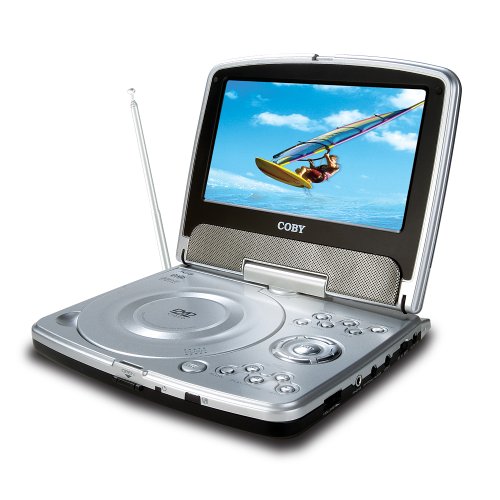
Image 1.1: Coby TF-DVD7380 Portable DVD Player with its 7-inch screen swiveled for view주고받음.
2. 패키지 내용
아래 나열된 모든 품목이 패키지에 포함되어 있는지 확인하세요.
- Coby TF-DVD7380 Portable DVD Player
- 원격 제어
- AV 케이블
- 100-240V UL listed AC adaptor
- DC 자동차 어댑터
- 스테레오 헤드폰
- 리튬 이온 충전지
- External antenna adapter
3. 주요 특징
- 컴팩트하고 휴대하기 편리한 디자인
- 7-inch Widescreen (16:9) TFT Color Display
- Swivel Screen for flexible view각도를 ing
- Plays DVD/DVD+R/RW/CD/CD-R/RW/MP3 and JPEG Compatible
- Built-in high sensitivity NTSC TV tuner
- Built-in anti-skip circuitry for stable playback
- Convenient on-screen display (OSD)
- 개인적인 청취를위한 헤드폰 잭
- Integrated Lithium-ion rechargeable battery
4. 제어 및 연결
Familiarize yourself with the various controls and connection ports on your Coby TF-DVD7380 unit. Specific button layouts may vary slightly, but common functions are described below.
4.1. Front/Top Panel Controls
- 전원 버튼: 장치를 켜거나 끕니다.
- 재생/일시 정지 버튼: 디스크 재생을 시작하거나 일시 정지합니다.
- 중지 버튼 : 디스크 재생을 중지합니다.
- 건너뛰기/검색 버튼: Skips to the next/previous track or chapter, or fast forwards/rewinds during playback.
- 메뉴 버튼: 디스크 메뉴 또는 시스템 설정에 접근합니다.
- 볼륨 컨트롤: 오디오 출력 레벨을 조정합니다.
- 모드 버튼: Switches between DVD, CD, MP3, JPEG, and TV modes.
- 열기 버튼: Releases the disc tray cover.
4.2. Side/Rear Panel Connections
- 잭의 DC: Connects the AC adapter or car adapter for power and charging.
- AV Out Jack: Connects to an external display or audio system using the supplied AV cable.
- 헤드폰 잭: 스테레오 헤드폰을 연결합니다.
- 안테나 입력: Connects the external antenna adapter for TV reception.
5. 설정 가이드
5.1. 배터리 충전
- Connect the AC adapter to the DC In jack on the unit.
- AC 어댑터를 표준 벽면 콘센트에 꽂습니다.
- 충전 표시등이 켜집니다. 완전 충전에는 약 4~6시간이 소요됩니다.
- For car use, connect the DC car adapter to the DC In jack and plug it into your vehicle's cigarette lighter socket.
Note: It is recommended to fully charge the battery before first use to maximize battery life.
5.2. 디스크 삽입
- Press the "Open" button to release the disc tray cover.
- Carefully place the DVD or CD onto the disc spindle with the label side facing up.
- 디스크가 제자리에 들어갈 때까지 부드럽게 누릅니다.
- Close the disc tray cover until it latches securely.
5.3. Connecting the External Antenna (for TV Tuner)
- Locate the Antenna Input jack on the unit.
- Connect the supplied external antenna adapter to this jack.
- Extend the antenna fully for optimal reception. For improved reception, especially indoors, consider connecting a larger external antenna (not included) to the adapter.
6. 사용 설명서
6.1. Basic Disc Playback (DVD/CD/MP3/JPEG)
- 장치의 전원이 켜져 있는지 확인하십시오.
- Insert a compatible disc as described in Section 5.2.
- The unit should automatically detect the disc type and begin playback or display the disc menu.
- Use the Play/Pause, Stop, Skip/Search, and Volume buttons on the unit or remote control to manage playback.
- For DVD menus, use the directional buttons and Enter button on the remote to navigate.
6.2. Using the TV Tuner
- Connect the external antenna as described in Section 5.3.
- Press the "Mode" button repeatedly until "TV" mode is selected.
- The first time you use the TV tuner, you may need to perform a channel scan. Access the TV menu (usually via the "Menu" button on the remote) and select "Auto Scan" or "Channel Search."
- Once channels are scanned, use the Channel Up/Down buttons on the unit or remote to change channels.
- Adjust volume using the Volume controls.
Note: TV reception quality can vary significantly based on location, antenna type, and local broadcast signals.
6.3. 리모컨 사용
The included remote control provides full functionality for the TF-DVD7380. Ensure batteries are correctly inserted. Point the remote control directly at the unit's IR sensor for optimal response.
- 힘: 켜기/끄기
- 숫자 키패드: Direct track/chapter selection, channel input.
- Directional Buttons (Up/Down/Left/Right) & Enter: 메뉴 탐색.
- OSD : On-Screen Display information.
- 설정: 시스템 설정에 접근합니다.
- Title/Menu: Accesses DVD title or root menu.
- 음성/자막: Changes audio tracks or subtitle languages.
- 줌: 화면 확대/축소 수준을 조정합니다.
- 반복하다: Repeats current track/chapter/disc.
7. 유지관리 및 관리
7.1. 장치 청소
- 부드럽고 마른 천으로 제품 외부를 닦으십시오.
- 완고한 자국의 경우 약간 damp천을 물에 적셔주세요. 연마성 세제, 왁스 또는 용제를 사용하지 마세요.
- Keep the screen clean using a soft, lint-free cloth. Avoid pressing hard on the screen.
7.2. 배터리 관리
- 기기를 자주 사용하지 않더라도 배터리를 정기적으로 충전하십시오.
- 장시간 배터리를 완전히 방전시키지 마세요.
- 배터리를 극한의 온도에 노출시키지 마십시오.
- If the unit will not be used for a long time, store it with a partially charged battery (around 50%).
7.3. 디스크 관리
- 디스크를 다룰 때는 지문이나 긁힘이 묻지 않도록 가장자리를 잡으세요.
- 디스크를 사용하지 않을 때는 케이스에 보관하십시오.
- 부드럽고 보푸라기가 없는 천으로 디스크를 닦고, 중앙에서 바깥쪽으로 닦으세요.
- 디스크에 용제나 연마성 세척제를 사용하지 마세요.
8. 문제 해결
| 문제 | 가능한 원인 | 해결책 |
|---|---|---|
| 장치의 전원이 켜지지 않습니다. | Battery is discharged; AC adapter not connected or faulty. | Connect the AC adapter and charge the battery. Ensure the power outlet is functional. |
| 디스크 재생이 안 됩니다. | 디스크를 잘못 넣었습니다. 디스크가 더럽거나 긁혔습니다. 디스크 형식이 호환되지 않습니다. | Reinsert the disc correctly. Clean the disc. Ensure the disc format is supported (DVD, CD, MP3, JPEG). |
| Poor TV reception. | Antenna not connected or positioned poorly; weak broadcast signal. | Ensure the external antenna is connected and fully extended. Try repositioning the antenna or the unit. Perform a channel scan. Consider a stronger external antenna. |
| 소리가 나지 않습니다. | Volume too low; headphones not fully inserted; audio settings incorrect. | Increase the volume. Ensure headphones are fully plugged in. Check audio settings in the system menu. |
| 리모컨이 작동하지 않습니다. | 배터리가 소진되었거나 잘못 삽입되었습니다. 리모컨과 장치 사이에 장애물이 있습니다. | Replace remote control batteries. Ensure correct polarity. Remove any obstructions and point directly at the unit's IR sensor. |
9. 사양
- 모델: TF-DVD7380
- 표시하다: 7-inch TFT Color Display, 16:9 Widescreen
- 호환 디스크 형식: DVD, DVD+R/RW, CD, CD-R/RW, MP3, JPEG
- TV 시스템 : NTSC (Built-in high sensitivity TV tuner)
- Anti-Skip: Built-in circuitry
- 오디오 출력: Stereo headphone jack, AV output
- 전원: 100-240V AC adapter, DC car adapter, Lithium-ion Rechargeable battery
- 치수: 약 8 x 6 x 2cm(20.3 x 15.2 x 5.1인치)
- 무게: 약 5kg(2.27파운드)
10. 보증 및 지원
Coby products are designed and manufactured to high quality standards. For information regarding warranty coverage, technical support, or service inquiries, please refer to the warranty card included with your product or visit the official Coby web사이트. 보증 청구를 위해 구매 증빙 자료를 보관하세요.
참고: 보증 약관은 지역에 따라 다를 수 있습니다.