
1. 서론
구매해주셔서 감사합니다asing the GPX BCD2004 Boombox. This portable audio system features a top-loading CD player and an AM/FM tuner, designed for versatile audio playback. This manual provides essential information for setting up, operating, and maintaining your device to ensure optimal performance and longevity.
2. 안전 정보
- 지침을 읽어보세요: Carefully read all operating instructions before using the unit.
- 지시사항을 보관하세요: 이 설명서를 향후 참고용으로 보관하세요.
- 물과 습기: Do not expose this appliance to dripping or splashing water. Do not place objects filled with liquids, such as vases, on the appliance.
- 통풍: 적절한 환기를 유지하세요. 환기구를 막지 마세요.
- 열: 라디에이터, 난방 조절기, 스토브 또는 기타 장치(예: 열원) 근처에 두지 마십시오. amp열을 생성하는 발전기.
- 전원: Use only the power source indicated on the appliance.
- 배터리: Follow battery safety guidelines. Do not mix old and new batteries, or different types of batteries. Remove batteries if the unit is not used for extended periods.
- 서비스: 모든 서비스는 자격을 갖춘 서비스 담당자에게 의뢰하세요.
3. 패키지 내용
다음 품목이 패키지에 포함되어 있는지 확인하세요.
- GPX BCD2004 Boombox Unit
- AC 전원 코드
- 사용자 설명서
4. 컨트롤 및 기능view
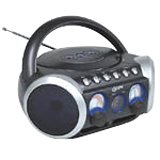
그림 1: 앞쪽 view of the GPX BCD2004 Boombox. This image shows the overall design of the boombox, including the speaker grilles and the general layout of the front panel.
Familiarize yourself with the main controls and features of your boombox:
- CD 수납공간: Top-loading bay for inserting CDs.
- 기능 스위치: Selects between CD, AM, FM, and OFF modes.
- 볼륨 조절: Rotary dial to adjust the audio output level.
- 튜닝 다이얼: Rotary dial for selecting AM or FM radio frequencies.
- 재생/일시 정지 버튼: Starts or temporarily stops CD playback.
- 중지 버튼 : CD 재생을 중지합니다.
- 건너뛰기/검색 버튼(◀◀ / ▶▶): Skips to the previous/next track or searches within a track.
- 프로그램 버튼: Used to program a sequence of tracks for CD playback.
- 반복 버튼: 현재 재생 중인 트랙 또는 CD 전체를 반복 재생합니다.
- AM/FM 안테나: Telescopic antenna for FM reception, internal antenna for AM.
- AC 전원 입력: Jack for connecting the AC power cord.
- 배터리 칸: Located on the bottom or rear for 'C' batteries.
- Fold-down Carrying Handle: 간편한 휴대를 위해.
5. 설정
5.1 장치 전원 공급
Your GPX BCD2004 Boombox can be powered by either AC power or batteries.
AC 전원 작동
- Ensure the Function Switch is in the OFF position.
- Insert the small end of the AC power cord into the AC power input jack on the back of the unit.
- AC 전원 코드의 다른 쪽 끝을 표준 AC 벽면 콘센트(120V ~ 60Hz)에 꽂으십시오.
배터리 전원 작동
For portable use, the boombox requires 8 'C' size batteries (not included).
- Ensure the Function Switch is in the OFF position.
- 장치 하단이나 후면에 있는 배터리 칸 덮개를 엽니다.
- 배터리 칸 내부에 표시된 극성(+, -)을 확인하여 'C' 사이즈 배터리 8개를 삽입하십시오.
- 배터리 덮개를 단단히 닫으세요.
- 메모: 배터리 전원으로 작동할 때는 AC 전원 코드를 기기에서 분리하십시오.
6. CD 플레이어 작동 방법
The GPX BCD2004 is compatible with standard audio CDs, CD-R, and CD-RW discs.
6.1 CD 넣기
- 기기 상단에 있는 CD 수납부 덮개를 들어 올리세요.
- Place a CD onto the center spindle with the label side facing up.
- Gently close the CD compartment door until it clicks shut.
6.2 기본 CD 재생
- 기능 스위치를 CD 위치로 설정합니다.
- The CD player will begin to read the disc. The track number will typically display.
- Press the PLAY/PAUSE (▶/██) button to start playback.
- Adjust the Volume Control to your desired listening level.
- To pause playback, press the PLAY/PAUSE (▶/██) button. Press it again to resume.
- 재생을 멈추려면 STOP(■) 버튼을 누르세요.
6.3 Skipping and Searching Tracks
- 트랙 건너 뛰기 : During playback, press the SKIP/SEARCH FORWARD (▶▶) button to go to the next track. Press the SKIP/SEARCH BACKWARD (◀◀) button to go to the beginning of the current track, or press it twice to go to the previous track.
- Search Within Track: During playback, press and hold the SKIP/SEARCH FORWARD (▶▶) or SKIP/SEARCH BACKWARD (◀◀) button to fast forward or rewind through the current track. Release the button to resume normal playback.
6.4 Program Play
최대 16개의 트랙을 특정 순서대로 재생하도록 프로그래밍할 수 있습니다.
- In STOP mode, press the PROGRAM button. The program indicator will flash.
- Use the SKIP/SEARCH buttons (◀◀ / ▶▶) to select your desired first track.
- Press the PROGRAM button again to confirm the selection.
- 2단계와 3단계를 반복하여 프로그램 목록에 최대 16개의 트랙을 추가하세요.
- After programming all desired tracks, press the PLAY/PAUSE (▶/██) button to start programmed playback.
- 프로그램을 초기화하려면 STOP(■) 버튼을 두 번 누르십시오.
6.5 Repeat Play
During CD playback, press the REPEAT button:
- 한 번 누르세요 1번 반복 (repeats the current track).
- Press twice for 모두 반복 (repeats the entire CD or programmed tracks).
- Press a third time to cancel repeat function.
7. AM/FM 라디오 작동법
7.1 Tuning to Radio Stations
- Set the Function Switch to either the AM or FM position.
- Adjust the Tuning Dial to select your desired radio station.
- Adjust the Volume Control to your desired listening level.
7.2 Improving Radio Reception
- FM 수신: 텔레스코픽 안테나를 완전히 펼친 후 수신 상태가 가장 좋은 위치로 조정하십시오.
- 오전 리셉션: The unit has a built-in AM antenna. Rotate the entire boombox for optimal AM reception.
8. 유지관리
8.1 장치 청소
- 부드러운 천으로 기기 외부를 닦아주세요.amp 천. 연마성 세척제나 용매를 사용하지 마십시오.
- CD 렌즈의 경우, CD 렌즈 전용 클리닝 디스크 또는 광학 렌즈 전용으로 제작된 부드럽고 보풀 없는 천을 사용하십시오.
8.2 배터리 관리
- 장기간 사용하지 않을 경우 배터리 누출을 방지하기 위해 배터리를 제거하세요.
- 사용한 배터리는 현지 규정에 따라 책임감 있게 폐기하십시오.
9. 문제 해결
If you experience issues with your boombox, please refer to the following common problems and solutions:
| 문제 | 가능한 원인 | 해결책 |
|---|---|---|
| 전원이 없습니다 | AC cord not connected; Batteries dead or incorrectly inserted; Function switch OFF. | Check AC cord connection; Replace batteries or check polarity; Set Function switch to CD, AM, or FM. |
| CD가 재생되지 않습니다 | CD inserted incorrectly; CD dirty or scratched; CD compartment door open; Function switch not on CD. | Insert CD with label side up; Clean or replace CD; Close CD door securely; Set Function switch to CD. |
| 라디오 수신 불량 | 안테나가 펼쳐지거나 조정되지 않았습니다. 신호가 약합니다. | Extend and adjust FM antenna; Rotate unit for AM reception; Try a different location. |
| 소리가 나지 않거나 볼륨이 작음 | Volume too low; Unit in pause mode. | Increase volume; Press Play/Pause button to resume playback. |
10. 사양
- 모델: BCD2004
- 상표: 한국어:
- CD 호환성: CD, CD-R, CD-RW
- 라디오 튜너: 오전/FM
- 전원: 교류 120V ~ 60Hz 또는 'C'형 배터리 8개(별도 구매)
- 스피커: 2 Full-range speakers
- 치수(대략): 33.02 x 27.94 x 17.02cm(길이 x 너비 x 높이)
- 무게(대략): 2.18kg
- 특징: 16-track programming, Repeat play, Song skip/search, Fold-down carrying handle
11. 보증 및 지원
This GPX BCD2004 Boombox comes with a 90일 보증 최초 구매일로부터 보증합니다. 본 보증은 정상적인 사용 중에 발생하는 재료 및 제조상의 결함을 보장합니다.
For warranty service or technical support, please refer to the contact information provided with your purchase documentation or visit the official GPX website. Please have your model number (BCD2004) and proof of purchase ready when contacting support.