
소개
The D-Link DSM-320 Wireless Media Player is designed to stream digital media files from your personal computer to your home entertainment system. This device supports 802.11g wireless standards, enabling transfer speeds up to 54 Mbps. It is compatible with various audio, video, and image formats, allowing you to enjoy your digital content on your television and stereo system. The DSM-320 integrates with your network to provide access to stored media and online content through a user-friendly interface and included remote control.
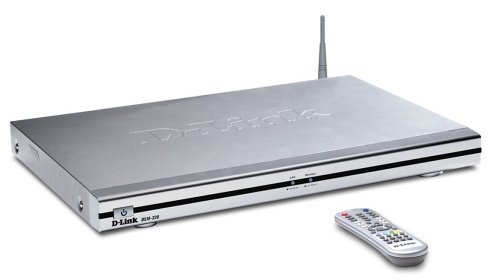
Image: D-Link DSM-320 Wireless Media Player. This image shows the front of the media player unit along with its remote control, illustrating its compact design.
주요 특징
- Supports 802.11g wireless standards for data transfer speeds up to 54 Mbps.
- Compatible with popular media formats including MP3, WAV, WMA (audio); MPEG-1, MPEG-2, MPEG-4, AVI, DivX4/5, QuickTime, Xvid (video); and JPEG, GIF, BMP, PNG, JPEG2000, TIFF (images).
- Enables access to digital media content stored on your PC, allowing browsing of music files, watching videos, and displaying photos on your television.
- Offers connectivity via 802.11g wireless or Ethernet.
- Compatible with Windows 98SE, Me, 2000, or XP operating systems.
- Adheres to Universal Plug and Play (UPnP) AV specification and Intel Networked Media Product Requirements (INMPR).
패키지 내용
패키지에 다음 품목이 포함되어 있는지 확인하십시오.
- D-Link DSM-320 Wireless Media Player
- 원격 제어
- 전원 어댑터
- 무선 안테나
- Audio/Video Cables (e.g., Video-S cable, RCA stereo cables)
- Installation CD (containing media server software)
- 빠른 설치 가이드(이 디지털 매뉴얼에는 포함되지 않음)
설정
1. 하드웨어 연결
- Connect the Wireless Antenna: Attach the included wireless antenna to the designated port on the back of the DSM-320 unit.
- 텔레비전에 연결하세요:
- For video, connect a Video-S cable (included) from the Video-S port on the back of the DSM-320 to the Video-S input on your television.
- For audio, connect red/white RCA component cables from the audio output ports on the back of the DSM-320 to an available audio input (e.g., AUX-V) on your A/V receiver or television.
- 네트워크 연결 :
- 무선 전화: Ensure the wireless antenna is connected. The device will connect wirelessly during software setup.
- 유선 연결 (선택 사항): If using a wired connection, connect an Ethernet cable from the DSM-320's Ethernet port to your network router or switch.
- 전원 켜기: Plug the power adapter into the DSM-320 and then into a power outlet. Turn on your television and select the correct input source for the DSM-320.
2. Software Installation (Media Server)
The DSM-320 requires media server software to be installed on your personal computer to access your digital files. This software allows you to designate folders containing your music, photos, and videos for streaming.
- Insert the provided Installation CD into your computer's CD/DVD drive.
- Follow the on-screen instructions to install the D-Link Media Server software.
- During or after installation, configure the software to select the specific folders on your hard drive that contain the media files you wish to stream. You can add or remove folders later as needed.
3. Network Configuration (On-Screen Wizard)
After powering on the DSM-320 and selecting the correct TV input, an on-screen setup wizard will appear.
- Use the included remote control to navigate the setup wizard.
- The device will automatically scan for available wireless networks (SSIDs). Select your home network from the list.
- If your network is secured, you will be prompted to enter your wireless security key (e.g., WEP key) using the on-screen keyboard and remote control.
- Once connected, the DSM-320 will attempt to locate media servers on your network (your computer with the installed software).
- Confirm the connection and proceed to the main menu.
작업
인터페이스 탐색
The DSM-320 features a user-friendly TV interface. Use the remote control to navigate through the main menu options, which typically include categories such as Photos, Music, and Video.
- Use the arrow keys on the remote to move between menu items.
- Press the 'OK' or 'Enter' button to select an item or enter a sub-menu.
- Use the 'Back' or 'Return' button to go to the previous screen.
미디어 재생
Once you have selected a media category (e.g., Music), you can browse the files shared from your media server. Select a file 재생을 시작합니다.
- 음악: Browse by artist, album, genre, or folder. Select a track to play. You can create playlists or play music while view잉 사진.
- 사진: Browse by folder. Select an image to view, or initiate a slideshow. Ensure your TV's aspect ratio is set appropriately (e.g., 4:3 for older photos) for optimal view주고받음.
- 비디오: Browse by folder. Select a video file to play. The DSM-320 supports various video formats.
원격 제어 기능
The remote control provides full control over the DSM-320's functions. Ensure a direct line of sight to the media player for optimal responsiveness.
- 힘: 장치를 켜거나 끕니다.
- 탐색(화살표 키, 확인): 메뉴 탐색 및 선택을 위해.
- Playback Controls (Play, Pause, Stop, FF, Rew, Skip): 미디어 재생을 제어하기 위한 것입니다.
- 용량: 오디오 출력 볼륨을 조절합니다.
- 메뉴/홈: 메인 메뉴로 돌아갑니다.
유지
To ensure the longevity and optimal performance of your D-Link DSM-320, follow these maintenance guidelines:
- 청소: 제품 외부를 닦을 때는 부드럽고 마른 천을 사용하십시오. 액체 세제나 연마성 재질은 사용하지 마십시오.
- 통풍: Ensure the unit is placed in a well-ventilated area, away from direct sunlight or heat sources, to prevent overheating.
- 펌웨어 업데이트: Periodically check the D-Link support website for available firmware updates. Updating the firmware can improve performance and add new features.
- 원격 제어: 필요에 따라 리모컨의 배터리를 교체하십시오.
문제 해결
This section addresses common issues you might encounter with your DSM-320 Wireless Media Player.
No Power / No Display on TV
- Ensure the power adapter is securely connected to both the DSM-320 and a working power outlet.
- Verify that your television is turned on and set to the correct input source (e.g., Video-S, AV1) where the DSM-320 is connected.
Cannot Connect to Wireless Network
- Confirm the wireless antenna is securely attached to the DSM-320.
- Double-check that you have entered the correct wireless security key (WEP/WPA) during the setup wizard. Security keys are case-sensitive.
- Ensure your wireless router is powered on and broadcasting its SSID.
- Move the DSM-320 closer to your wireless router to improve signal strength.
- If possible, try a wired Ethernet connection to rule out wireless issues.
Cannot Find Media Files / Media Server
- Ensure the D-Link Media Server software is running on your computer.
- Verify that the folders containing your media files are correctly selected and shared within the media server software.
- Check your computer's firewall settings to ensure they are not blocking communication with the DSM-320.
- Confirm that your computer and the DSM-320 are on the same network.
Video Playback Issues (Freezing, Choppy, Not Continuous)
- Ensure your wireless network has sufficient bandwidth. Large video files may require a strong and stable connection. Consider a wired Ethernet connection for demanding video streams.
- Verify that the video file format is supported by the DSM-320 (MPEG-1, -2, -4, AVI, DivX4/5, QuickTime, Xvid).
- 일부 비디오 files, particularly VOB files from DVDs, may not play continuously. You might need to manually select the next segment.
- Fast forward functionality may not work as expected with all video formats or media server configurations.
리모콘이 응답하지 않음
- Ensure there is a clear, direct line of sight between the remote control and the front of the DSM-320 unit.
- 리모컨의 배터리를 교체하세요.
Incorrect Photo Aspect Ratio
- Adjust your television's aspect ratio setting (e.g., to 4:3) before viewing photos to prevent stretching or cropping, especially for older images.
명세서
| 상표 | 디링크 |
| 모델명 | DSM-320 |
| 연결 기술 | Wireless (802.11g), Ethernet |
| 지원되는 오디오 형식 | MP3, WAV, WMA |
| 지원되는 비디오 형식 | MPEG-1, MPEG-2, MPEG-4, AVI, DivX4/5, QuickTime, Xvid |
| 지원되는 이미지 형식 | JPEG, GIF, BMP, PNG, JPEG2000, TIFF |
| 비디오 출력 해상도 | 최대 720p |
| 호환 장치 | 텔레비전 |
| 컨트롤러 유형 | 원격 제어 |
| 품목 무게 | 1.2 킬로그램 |
| 색상 | 은 |
| 제조업체 | (주)디링크시스템즈 |
| 한국어: | 790069267222, 790069267192 |
보증 및 지원
보증: The D-Link DSM-320 Wireless Media Player comes with a 3-year limited warranty from the date of purchase. Please retain your proof of purchase for warranty claims. For detailed warranty terms and conditions, refer to the documentation included with your product or visit the official D-Link web대지.
기술 지원: For technical assistance, product registration, or to download the latest drivers and firmware, please visit the official D-Link support web해당 사이트에는 일반적으로 FAQ, 문제 해결 가이드 및 고객 서비스 연락처 정보가 포함된 지원 자료가 있습니다.
메모: Product specifications and warranty information are subject to change without notice. Always refer to the latest information provided by the manufacturer.