

소개
This manual provides comprehensive instructions for the proper installation and use of the Metra 70-2001 Radio Wiring Harness. This harness is specifically designed to facilitate the installation of an aftermarket car stereo into compatible General Motors vehicles, ensuring a secure and reliable electrical connection without cutting factory wiring.
안전 정보
- Always disconnect the vehicle's negative battery terminal before beginning any electrical installation to prevent short circuits and electrical shock.
- Ensure all wiring connections are secure and properly insulated using electrical tape, crimp connectors, or heat shrink tubing. Loose connections can lead to electrical malfunctions or fire hazards.
- 설치 과정 중 확실하지 않은 부분이 있으면 전문 자동차 정비사에게 문의하십시오.
- Do not modify the wiring harness. Any alterations may void the product warranty and could cause damage to your vehicle's electrical system.
- 설치하는 동안 안전 안경 등 적절한 개인 보호 장비를 착용하세요.
차량 호환성
The Metra 70-2001 Radio Wiring Harness is compatible with select General Motors vehicles manufactured between 1994 and 2004. This includes various models from Buick, Cadillac, Chevrolet, GMC, Oldsmobile, and Pontiac within this year range.
중요한: Always verify that your vehicle's factory wiring harness connector physically matches the Metra 70-2001 connector before proceeding with installation. Vehicle models and trim levels can vary, and some vehicles within the specified range may use a different connector.
패키지 내용
포장을 개봉하신 후, 모든 구성품이 있는지, 손상되지 않았는지 확인하십시오.
- Metra 70-2001 Radio Wiring Harness (GM 32-Pin Connector)

Image: The Metra 70-2001 Radio Wiring Harness shown in its retail packaging, indicating the product model and compatibility.
설치 지침(설정)
필요한 도구
- 전선 스트리퍼
- 와이어 크림퍼
- 전기 테이프 또는 열수축 튜브
- 멀티미터 (선택 사항, 연결 상태 확인용)
- Panel Removal Tools (for vehicle interior trim)
설치 전 단계
- 배터리 분리: 차량 배터리의 위치를 찾아 음극(-) 단자를 분리하여 감전 사고를 예방하십시오.
- 공장 라디오 제거: Carefully remove the factory radio from the dashboard. This typically involves removing trim panels and unscrewing the radio unit.
- 공장 출고 시 장착된 배선을 확인하십시오. Locate the factory wiring harness that was connected to the original radio.
배선 연결
The Metra 70-2001 harness is designed to connect directly to your aftermarket radio's wiring. Match the wires from your aftermarket radio to the corresponding wires on the Metra 70-2001 harness. Refer to the wiring diagram section below for standard color codes. Ensure each connection is secure and properly insulated.
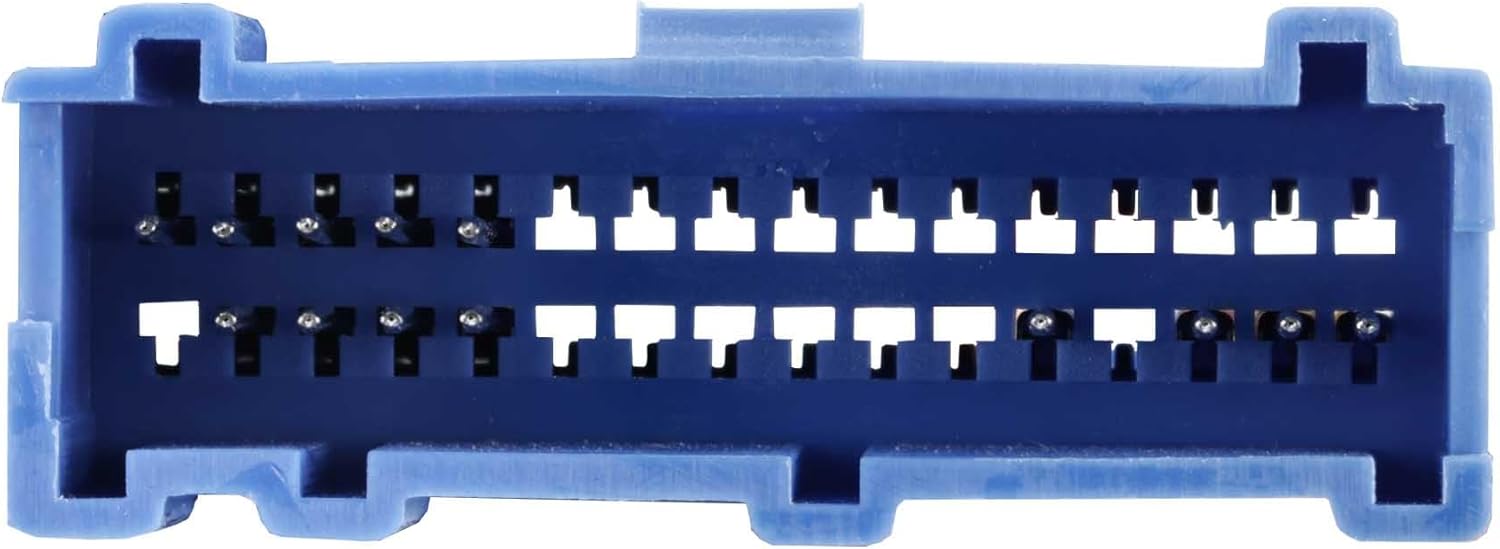
Image: The Metra 70-2001 Radio Wiring Harness showing the multi-colored wires ready for connection to an aftermarket radio.
마지막 단계
- 연결 하네스: Plug the Metra 70-2001 harness into the vehicle's factory radio connector.
- 테스트 기능: Reconnect the vehicle's negative battery terminal. Turn on the ignition and test the aftermarket radio's power, sound, and other functions.
- 고정 및 재조립: Once confirmed working, carefully tuck away excess wiring, mount the aftermarket radio, and reassemble any removed dashboard trim panels.
배선도
The following table outlines the standard wire color codes for the Metra 70-2001 harness. It is crucial to cross-reference these with the wiring diagram provided with your specific aftermarket radio, as color codes can vary between manufacturers.

이미지: 자세한 view of the 32-pin connector on the Metra 70-2001 harness, showing the pin configuration.
| 와이어 색상 | 기능 |
|---|---|
| 노란색 | 12V 정전력 |
| 빨간색 | 12V 액세서리 전원 |
| 검은색 | 지면 |
| 주황색 | 조명 |
| 파란색 | 전원 안테나 / Amp리파이어 턴온 |
| 하얀색 | 전면 좌측 스피커(+) |
| 흰색/검정색 | 전면 좌측 스피커(-) |
| 회색 | 전면 우측 스피커(+) |
| 회색/검정색 | 전면 우측 스피커(-) |
| 녹색 | 후면 좌측 스피커(+) |
| 녹색/검정색 | 후면 좌측 스피커(-) |
| 보라 | 후면 우측 스피커(+) |
| 보라색/검정색 | 후면 우측 스피커(-) |
작업
Once correctly installed, the Metra 70-2001 Radio Wiring Harness functions as a direct interface between your aftermarket radio and the vehicle's existing electrical system. It provides the necessary power, ground, accessory, and speaker connections, allowing your new radio to operate as intended, delivering audio to the vehicle's speakers and receiving power from the ignition and constant battery sources.
유지
The Metra 70-2001 Radio Wiring Harness is a passive electrical component and requires no routine maintenance. It is designed for a long service life once properly installed. Periodically, if you experience audio issues, you may check the harness connections to ensure they remain secure and free from corrosion or damage.
문제 해결
- 라디오에 전원이 들어오지 않습니다:
- 차량의 퓨즈 박스를 점검하여 라디오 또는 기타 액세서리 전원과 관련된 퓨즈가 끊어졌는지 확인하십시오.
- Ensure the yellow (constant power) and red (accessory power) wires are correctly connected and receiving voltage.
- Verify the black (ground) wire has a solid connection to chassis ground.
- 스피커에서 소리가 나지 않습니다:
- Confirm all speaker wires (white, gray, green, purple and their black-striped counterparts) are correctly matched and connected between the radio and the harness.
- Check the radio's fader and balance settings.
- 라디오의 amplifier turn-on wire (if applicable, usually blue) is connected.
- 간헐적 문제:
- Recheck all wire connections for looseness or poor contact. Ensure all crimps or solder joints are solid.
- Inspect the harness for any pinched or damaged wires.
명세서
- 상표: 메트라
- 모델: 70-2001
- 커넥터 유형: IDC (32-pin GM connector)
- 재료: ABS, 플라스틱
- 포함된 구성 요소: 1994–2005 GM 32-Pin into Car Harness
- 케이블 유형: Power & Speaker
- 항목 치수(L x W x H): 약 8 x 0.12 x 0.5인치
- 품목 무게: 약 22.68그램
보증 및 지원
보증: This product comes with a 1-Year Limited Warranty from the date of purchase. This warranty covers defects in materials and workmanship under normal use. It does not cover damage resulting from improper installation, accident, abuse, or unauthorized modifications.
고객 지원: For technical assistance, troubleshooting, or warranty claims, please contact Metra Electronics customer service directly. You can find contact information and additional resources on the official Metra web대지.
공식적인 Web대지: 메트로 온라인.com