
D-Link DGS-1005D/B
D-Link DGS-1005D/B 5-Port Gigabit Unmanaged Plastic Desktop Switch
Model: DGS-1005D/B
1. 서론
The D-Link DGS-1005D/B is a 5-Port Gigabit Unmanaged Plastic Desktop Switch designed to provide high-speed network connectivity for your home or small office. Its plug-and-play design allows for quick and easy installation, enabling fast file transfers and smooth media streaming across up to five devices. This manual provides detailed instructions for setting up, operating, and maintaining your DGS-1005D/B switch.
2. 패키지 내용
패키지에 다음 품목이 모두 들어 있는지 확인해 주십시오.
- 1x DGS-1005D Switch
- 4x 고무 발
- 1x CD-ROM with Product Documentation
- 1x 전원 어댑터
- 1x 장착 키트
- 1x 빠른 설치 안내서
3. 제품 특징
- Energy Efficient Ethernet: Reduces energy consumption without sacrificing performance, contributing to lower power bills.
- Quiet and Economical Design: Features an innovative design that runs cool and quiet, making it an unobtrusive addition to any workspace.
- 기가비트 속도: Creates a blazing fast network with five Gigabit Ethernet ports, providing high-speed wired connections for up to five PCs or other devices.
- 케이블 진단: Includes a function that notifies users of cable conditions through product LEDs, aiding in troubleshooting.
- 제한된 평생 보증: Register and enjoy Limited Lifetime Warranty support from D-Link, a global leader in the industry.
4. 제품 오버view
4.1 전면 패널

The front panel of the DGS-1005D/B switch features LED indicators for power and each of the five Gigabit Ethernet ports. These LEDs provide visual feedback on the connection status and activity of each port, allowing for quick monitoring of your network.
4.2 후면 패널
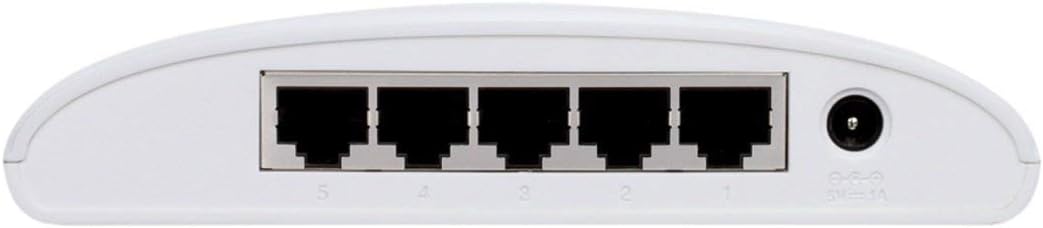
The rear panel houses the five Gigabit Ethernet ports (RJ45) for connecting your network devices and the power input jack. The ports are clearly numbered for easy identification and connection.
4.3 컴팩트 디자인

The DGS-1005D/B features a compact and lightweight plastic desktop design, making it easy to place on any desk or shelf without taking up much space. Its unobtrusive form factor blends seamlessly into various environments.
5. 설정
5.1 시작하기 전에
- Ensure you have a stable power source available.
- Have standard Ethernet cables (Cat5e or Cat6 recommended for Gigabit speeds) ready for connecting your devices.
5.2 스위치 연결
- 놓기: 스위치를 평평하고 안정된 표면에 놓으십시오.
- 고무 발 부착: Attach the four rubber feet to the bottom of the switch to prevent slipping and provide adequate ventilation.
- 전원 연결: Connect the power adapter to the power input jack on the rear of the switch and then plug the adapter into a power outlet. The Power LED on the front panel should illuminate, indicating the switch is receiving power.
- 장치 연결: Connect your network devices (e.g., computers, network-attached storage, gaming consoles) to any of the five Gigabit Ethernet ports using standard Ethernet cables. The corresponding port LEDs will illuminate when a connection is established and blink to indicate network activity.
- 사용 준비: The switch is now ready for use. No software configuration is required due to its unmanaged design.
6. 사용 설명서
The D-Link DGS-1005D/B is an unmanaged switch, meaning it operates on a plug-and-play basis without requiring any software configuration. Once connected to power and network devices, it automatically detects network speeds (10/100/1000 Mbps) and adjusts for compatibility, providing seamless data transfer. The switch intelligently manages traffic flow to ensure optimal performance for all connected devices without user intervention.
7. 유지관리
To ensure optimal performance and longevity of your DGS-1005D/B switch, follow these maintenance guidelines:
- 환경: Keep the switch in a well-ventilated area, away from direct sunlight, heat sources, and excessive moisture.
- 청소: 부드럽고 마른 천으로 스위치 외부를 주기적으로 청소하세요. 액체 또는 에어로졸 세척제는 사용하지 마세요.
- 통풍: Do not block the ventilation slots on the device, as this can lead to overheating.
- 액체: 장치에 액체를 흘리지 마십시오.
8. 문제 해결
If you encounter issues with your DGS-1005D/B switch, refer to the following common problems and solutions:
- 전원 LED 없음:
- 전원 어댑터가 스위치와 작동하는 전원 콘센트에 안전하게 연결되어 있는지 확인하세요.
- 다른 장치를 연결하여 전원 콘센트가 활성화되어 있는지 확인하세요.
- Port LED Not Illuminating:
- 이더넷 케이블이 스위치 포트와 연결된 장치에 제대로 연결되어 있는지 확인하십시오.
- 연결된 장치의 전원이 켜져 있고 네트워크 어댑터가 올바르게 작동하는지 확인하세요.
- 케이블에 결함이 있는지 확인하려면 다른 이더넷 케이블을 사용해 보세요.
- Test with a different device to confirm the port's functionality.
- 네트워크 속도가 느립니다:
- 연결된 모든 장치와 케이블이 기가비트 이더넷을 지원하는지 확인하십시오(기가비트 속도를 위해서는 Cat5e 또는 Cat6 케이블을 사용하는 것이 좋습니다).
- 연결된 기기에서 과도한 네트워크 트래픽이나 대역폭을 많이 사용하는 애플리케이션이 실행 중인지 확인하십시오.
- Verify your internet service provider's speed if the issue is related to internet access.
9. 사양
| 특징 | 설명 |
|---|---|
| 상표 | 디링크 |
| 모델 번호 | DGS-1005D/B |
| 포트 수 | 5 |
| 인터페이스 유형 | RJ45 |
| 데이터 전송 속도 | 초당 1000메가바이트(기가비트 이더넷) |
| 케이스 소재 | 플라스틱 |
| 권tage | 230 볼트 |
| 품목 무게 | 0.01 온스 |
| 제품 크기(LxWxH) | 4.53 x 5.59 x 1.18 인치 |
| 호환 장치 | 데스크탑 |
| 언어 | 영어 |
| 한국어: | 790069252679 |
10. 보증 및 지원
The D-Link DGS-1005D/B 5-Port Gigabit Unmanaged Plastic Desktop Switch comes with a Limited Lifetime Warranty, providing peace of mind regarding its quality and durability. For technical support, product registration, or warranty claims, please refer to the contact information provided in the included product documentation or visit the official D-Link support web사이트에서 구매하세요. 보증 적용을 위해 구매 영수증을 보관하십시오.
Ask a question about this manual
Ask about setup, troubleshooting, compatibility, parts, safety, or missing instructions. Manuals+ will review the question and use this page’s manual context to help answer it.