
소개
This manual provides detailed instructions for the setup, operation, maintenance, and troubleshooting of your Panasonic DMR-E55S Progressive Scan DVD Recorder / Player. This unit allows for recording, editing, and storage on DVD-RAM and DVD-R discs, as well as playback of DVD, CD, CD-R, and MP3-on-CD formats. It features progressive scan video output for enhanced picture quality.
설정
1. 포장해체 및 구성품 확인
모든 구성품을 포장에서 조심스럽게 꺼내세요. 다음 품목이 모두 있는지 확인하세요.
- Panasonic DMR-E55S DVD Recorder / Player unit
- 원격 제어
- 전원 코드
- 오디오/비디오 케이블 (지역에 따라 종류가 다를 수 있음)
Retain all packaging materials for future transport or service needs.
2. TV에 연결하기
The DMR-E55S offers multiple connection options for video and audio output. Choose the best option supported by your television for optimal quality.

그림 1: 전면 view of the Panasonic DMR-E55S unit. This image shows the disc tray, display panel, and front controls.
- 컴포넌트 비디오 출력(Y, Pb, Pr): For the highest quality analog video connection, connect component video cables (green, blue, red) from the DMR-E55S to your TV's component video input.
- S-비디오 출력: Connect an S-video cable for improved video quality over composite video.
- 컴포지트 비디오 출력(노란색 RCA 단자): Connect a composite video cable for standard video quality.
- 오디오 출력(빨간색/흰색 RCA): Connect red and white RCA cables from the DMR-E55S to your TV's audio input or an audio receiver.
- 광학 디지털 오디오 출력: For digital surround sound, connect an optical cable to a compatible audio receiver.
- RF Coaxial Output: Connect a coaxial cable from the RF OUT jack on the DMR-E55S to your TV's antenna/cable input.

Figure 2: Rear panel of the Panasonic DMR-E55S, illustrating the various audio and video input/output ports for connection to a television or audio system.
3. 전원 연결
Connect the power cord to the AC IN terminal on the rear of the unit, then plug the other end into a standard electrical outlet.
4. 초기 전원 켜기 및 기본 설정
Press the power button on the unit or remote control. Follow any on-screen prompts for initial setup, such as language selection and automatic channel search if using the RF input.
작동 지침
1. 디스크 재생
The DMR-E55S supports playback of DVD-Video, DVD-R, DVD-RAM, CD, CD-R/RW, and MP3-on-CD discs.
- OPEN/CLOSE 버튼을 눌러 디스크 트레이를 엽니다.
- Place a disc on the tray with the label side facing up.
- Press OPEN/CLOSE again to close the tray. Playback will usually begin automatically.
- 재생, 일시 정지, 정지, 빨리 감기, 되감기 등의 재생 기능은 리모컨을 사용하여 조작하세요.

Figure 3: Front panel of the DMR-E55S during operation, showing the illuminated display with disc information.
2. Recording to DVD-RAM and DVD-R
The unit supports recording to both DVD-RAM and DVD-R discs. DVD-RAM discs allow for repeated recording and editing, while DVD-R discs are suitable for permanent recordings.
- 기록 가능한 디스크를 삽입하세요: Place a blank DVD-RAM or DVD-R disc into the disc tray.
- 입력 소스 선택: Use the INPUT SELECT button on the remote or front panel to choose the desired input source (e.g., Line 1, Line 2, Tuner).
- 원터치 녹음: Press the RECORD button to start recording immediately. Press it again to stop.
- 녹음 모드: The unit offers 4-mode recording (XP/SP/LP/EP) and Flexible Recording (FR) to optimize recording quality and duration based on available disc space.
- 타이머 녹화: Access the timer recording menu to schedule recordings at specific times and channels.
- Finalizing DVD-R Discs: After recording to a DVD-R disc, it must be finalized through the menu system to be playable on other DVD players. DVD-RAM discs do not require finalization.
3. Time Slip Features
The DMR-E55S includes Time Slip functions, primarily for DVD-RAM discs:
- Chasing Playback: Begin watching a program from the beginning while it is still being recorded.
- Playlist Playback: Create custom playlists from recorded content on DVD-RAM discs.
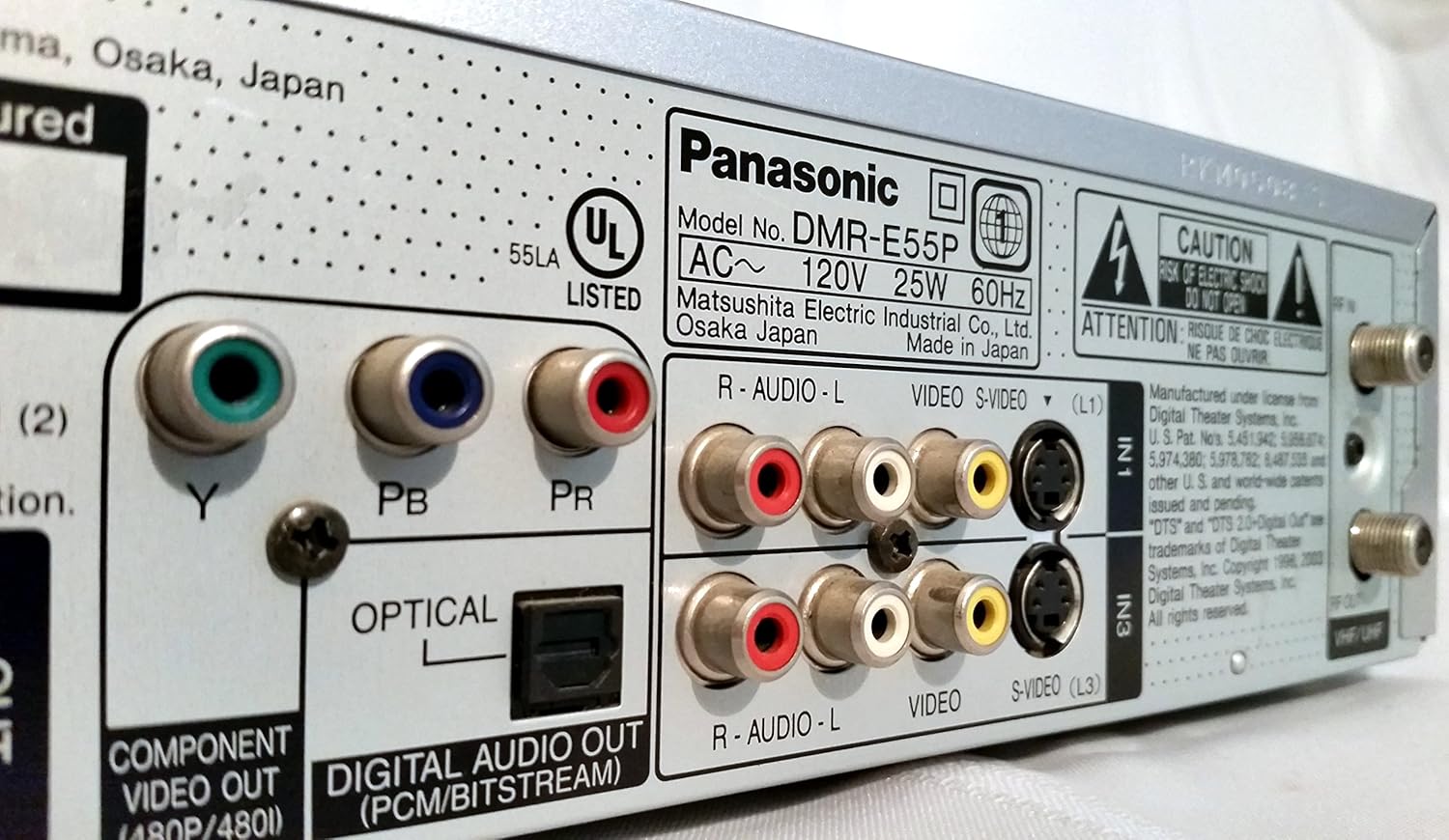
Figure 4: The remote control for the DMR-E55S, showing various buttons for playback, recording, and menu navigation.
유지
1. 장치 청소
제품 외부를 부드럽고 마른 천으로 닦으십시오. 액체 또는 에어로졸 세척제는 마감재나 내부 부품을 손상시킬 수 있으므로 사용하지 마십시오.
2. 디스크 관리
디스크를 다룰 때는 지문이나 흠집이 생기지 않도록 가장자리를 잡으십시오. 사용하지 않을 때는 디스크 케이스에 보관하십시오. 더러워진 디스크는 부드럽고 보풀 없는 천으로 중앙에서 바깥쪽으로 닦아주십시오.
문제 해결
DMR-E55S 사용 중 문제가 발생하면 다음의 일반적인 문제 및 해결 방법을 참조하십시오.
| 문제 | 가능한 원인 / 해결책 |
|---|---|
| 전원이 없습니다 | Ensure the power cord is securely connected to both the unit and a working electrical outlet. |
| 그림이나 소리가 나지 않습니다 | Verify all audio and video cables are correctly connected between the DMR-E55S and your TV/audio system. Check that your TV is set to the correct input source. |
| 디스크가 재생되지 않습니다 | Check if the disc is inserted correctly (label side up). Ensure the disc type is supported by the unit. Clean the disc if it is dirty or scratched. |
| 녹음할 수 없음 | Ensure a recordable DVD-RAM or DVD-R disc is inserted. Check if the disc has sufficient free space. Verify the input source is correctly selected. |
| Recorded DVD-R disc won't play on other players | The DVD-R disc may not have been finalized. Finalize the disc through the unit's menu system. |
| 리모컨이 작동하지 않습니다 | Check the batteries in the remote control and replace them if necessary. Ensure there are no obstructions between the remote and the unit's IR sensor. |
명세서
| 특징 | 설명 |
|---|---|
| 상표 | 파나소닉 |
| 모델명 | 디MR-E55S |
| 미디어 유형 | CD, DVD (DVD-RAM, DVD-R, DVD-Video, CD-R/RW, MP3-on-CD) |
| 특징 | 프로그레시브 스캔 |
| 해결 | 720 x 480 픽셀 |
| 비디오 출력 해상도 | 480p |
| 커넥터 유형 | RF, A/V (Composite), S-video, Component Video (Y, Pb, Pr), Optical Digital Audio |
| 오디오 출력 모드 | Surround (Dolby Digital, DTS compatible via optical output) |
| 지원되는 오디오 형식 | DVD-Audio (2-channel), DVD-Video with surround play, MP3 |
| 비디오 인코딩 | MPEG-2 (Hybrid Variable Bit Rate) |
| Analog Video Format | 한국어: |
| 녹화 모드 | XP, SP, LP, EP, FR (Flexible Recording) |
| 치수(폭 x 높이 x 깊이) | 16.9인치 x 3.13인치 x 11.2인치 |
| 품목 무게 | 8.58 파운드 |
| 포함된 액세서리 | 원격 제어 |
보증 정보
This Panasonic DMR-E55S unit comes with a one-year warranty covering parts and labor from the date of purchase. Please retain your proof of purchase for warranty claims. For detailed terms and conditions, refer to the warranty card included with your product or contact Panasonic customer support.
지원하다
For further assistance, technical support, or service inquiries, please contact Panasonic customer support. You can find contact information on the Panasonic official web사이트 또는 제품과 함께 제공된 설명서를 참조하세요.