
소개
This manual provides essential instructions for the safe and efficient use of your Olympus Note Corder 100 digital voice recorder. Please read this manual thoroughly before operating the device and retain it for future reference.
제품 끝view
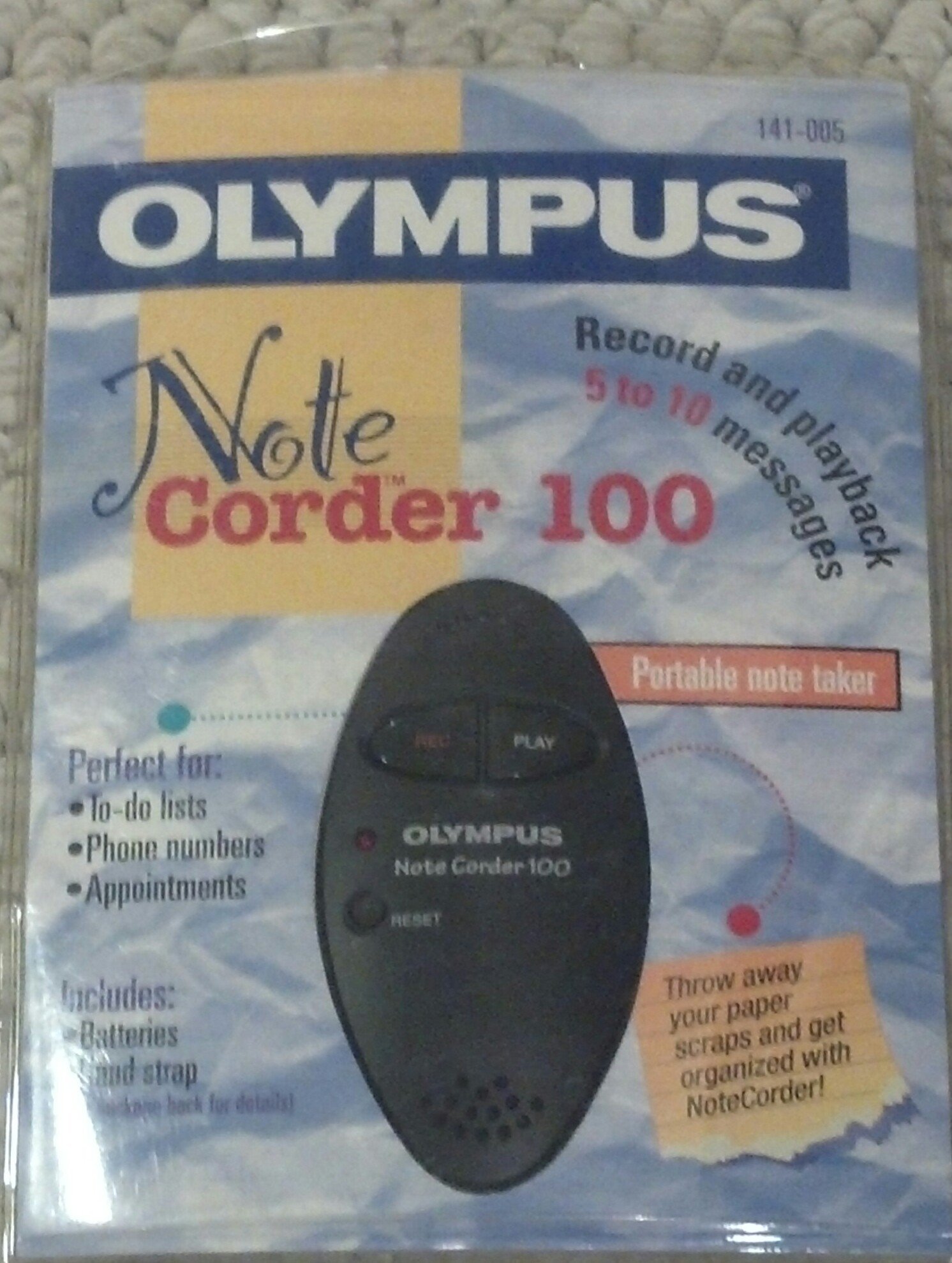
Image: The Olympus Note Corder 100 digital voice recorder, packaged. This image illustrates the product's compact design and highlights its primary features such as ergonomic design, 20-second recording time, and an LED indicator.
The Olympus Note Corder 100 is a compact, portable digital voice recorder designed for quick and convenient voice memos. Its ergonomic design ensures comfortable handling, making it ideal for recording short notes on the go.
주요 특징:
- 인체공학적 디자인: Fits comfortably in the palm of your hand.
- 20-Second Recording Time: Ideal for short, concise messages.
- LED 표시등: 장치 상태에 대한 시각적 피드백을 제공합니다.
- 내장 메모리 : Stores recordings internally.
- Portable Format: 휴대가 간편하고 어디서나 사용이 가능합니다.
설정
1. 배터리 설치
The Note Corder 100 requires two (2) CR2032 1.5V batteries for operation. Ensure correct polarity when inserting the batteries.
- 기기의 배터리 덮개를 찾으세요.
- 표시에 따라 덮개를 밀거나 들어 올려서 엽니다.
- Insert two CR2032 batteries, observing the positive (+) and negative (-) terminals.
- 배터리 덮개를 단단히 닫으세요.
2. 핸드 스트랩 부착
Attach the included hand strap to prevent accidental drops and for convenient carrying.
- Locate the strap attachment point on the device.
- Thread the thin loop of the hand strap through the attachment point.
- Pass the main strap through the loop and pull firmly to secure it.
작동 지침
1. 메시지 녹음
The Note Corder 100 allows for quick voice recordings up to 20 seconds in length.
- 를 누르고 계세요 기록 button. The LED indicator will illuminate.
- 내장 마이크에 대고 또렷하게 말해주세요.
- 릴리스하다 기록 button to stop recording. The LED indicator will turn off.
- If the recording exceeds 20 seconds, the device will automatically stop recording.
2. 메시지 재생
To listen to your recorded messages:
- 를 누르세요 놀다 button. The device will play back the last recorded message.
- 재생을 중지하려면 놀다 버튼을 다시 누르세요.
3. LED 표시등
The LED indicator provides visual cues for the device's status:
- Illuminated during Record: 현재 녹화 중임을 나타냅니다.
- 끄다: Indicates standby or stopped recording/playback.
유지
1. 배터리 교체
Replace batteries when the device's performance degrades or the LED indicator suggests low power.
- 설정 섹션에 설명된 배터리 설치 단계를 따르십시오.
- Always use two new CR2032 1.5V batteries.
- 현지 규정에 따라 오래된 배터리를 책임감 있게 폐기하십시오.
2. 청소
Keep your Note Corder 100 clean to ensure optimal performance.
- 기기 외부를 부드럽고 마른 천으로 닦아주세요.
- Do not use liquid cleaners, solvents, or abrasive materials.
- 어떠한 구멍에도 습기가 들어가지 않도록 주의하세요.
문제 해결
| 문제 | 가능한 원인 | 해결책 |
|---|---|---|
| 장치의 전원이 켜지지 않습니다. | 배터리가 방전되었거나 잘못 삽입되었습니다. | 배터리를 새 CR2032 배터리로 교체할 때 극성을 반드시 확인하십시오. |
| Cannot record messages. | Record button not held down, or batteries are low. | Ensure the Record button is pressed and held during recording. Check and replace batteries if necessary. |
| 재생 중에 소리가 나지 않습니다. | No message recorded, or low battery. | Verify a message has been recorded. Replace batteries. |
명세서
- 모델: Olympus Note Corder 100 (Model No. 141-005)
- 녹화 시간: Up to 20 seconds per message
- 전원: 2 x CR2032 1.5V Lithium Batteries
- 메모리: Built-in (non-expandable)
- 마이크로폰: 통합
- PC 연결 : 지원되지 않음
- 음성 활성화: 지원되지 않음
- Year of Introduction: 1996
보증 및 지원
The Olympus Note Corder 100 comes with a 90일 한정 보증 구매일로부터. 본 보증은 정상적인 사용 중 발생한 제조상의 결함에 적용됩니다.
For warranty claims or technical support, please contact Olympus America Inc. at the address below. Please have your proof of purchase and product model number ready.
Olympus America Inc.Two Corporate Center Drive
Melville, NY 11747-3157 USA
메모: This product was manufactured in China.