
중요한 안전 정보
본 기기를 작동하기 전에 모든 지침을 주의 깊게 읽어 주십시오. 나중에 참조할 수 있도록 이 설명서를 보관하십시오.
- 화재나 감전 위험을 방지하려면 장치를 비나 습기에 노출시키지 마십시오.
- 통풍구를 막지 마십시오. 기기 주변에 적절한 공기 흐름이 유지되도록 하십시오.
- 제품에 포함된 전원 어댑터만 사용하십시오. 승인되지 않은 어댑터를 사용하면 제품이 손상될 수 있으며 보증이 무효화될 수 있습니다.
- 제품을 불안정한 표면에 놓지 마십시오.
- 직접 기기를 수리하려고 하지 마십시오. 모든 수리는 자격을 갖춘 기술자에게 맡기십시오.
- 배터리는 현지 규정에 따라 올바르게 폐기하세요.
패키지 내용
패키지에 모든 품목이 들어 있는지 확인하세요.
- Coby TFDVD-7700 Portable DVD Player
- 전체 기능 원격 제어
- 리모컨 배터리
- 리튬 이온 충전지
- AC 전원 코드
- 100-240V UL Adapter
- DC Car/Boat Charger
- Car/Boat AC/DC Adapter and Cassette Audio Adapter
- 2 Sets of Stereo Headphones
- Headphone Jack Splitter
- 운반 파우치
- Headrest Mounting Pouch
- 사용자 매뉴얼(이 문서)
제품 끝view
The Coby TFDVD-7700 is a 7-inch side-loading portable DVD player designed for entertainment on the go. It features a widescreen TFT LCD display and built-in stereo speakers.
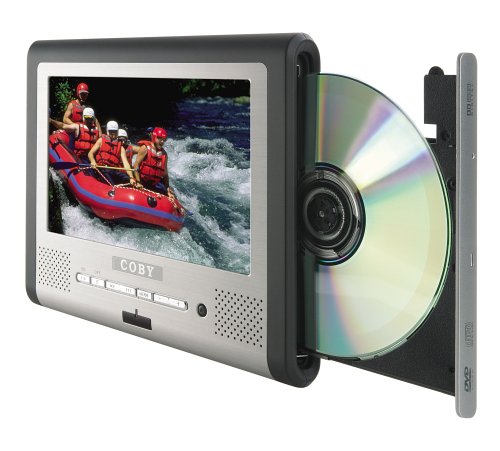
그림 1: Coby TFDVD-7700 Portable DVD Player and its remote control. The player features a 7-inch screen, control buttons below the screen, and a side-loading DVD slot. The remote control has numerous buttons for full functionality.
주요 특징:
- 7-inch Widescreen TFT LCD Display
- Side-loading DVD Mechanism
- Multi-format Playback (DVD, MP3 CD, JPEG CD)
- 내장 스테레오 스피커
- Composite Video Output for external display connection
- 전체 기능 원격 제어
- 충전식 리튬이온 배터리
- Picture Zoom and Parental Controls
설정
1. 배터리 충전
- Connect the 100-240V UL adapter to the DC IN port on the DVD player.
- 어댑터를 표준 벽면 콘센트에 연결합니다.
- Allow the unit to charge fully before first use (approximately 3-4 hours). The charging indicator light will typically change color or turn off when charging is complete.
- For in-car use, connect the DC car charger to the DC IN port and plug it into your vehicle's cigarette lighter socket.
2. Inserting the Remote Control Battery
- 리모컨 뒷면의 배터리 수납칸을 엽니다.
- Insert the supplied battery, ensuring correct polarity (+/-).
- 배터리 칸을 단단히 닫으세요.
3. 외부 디스플레이 연결 (선택 사항)
- Locate the composite video output port on the DVD player.
- Connect a composite video cable (not always included, may need to be purchased separately) from the player's video output to the video input of your TV or monitor.
- Ensure your TV/monitor is set to the correct input source.
작동 지침
1. 전원 켜기 / 끄기
- To power on, slide the POWER switch to the ON position or press the POWER button on the remote.
- To power off, slide the POWER switch to the OFF position or press the POWER button on the remote.
2. 디스크 삽입
- With the unit powered on, gently insert a DVD, MP3 CD, or JPEG CD into the side-loading disc slot with the label side facing up.
- 플레이어가 자동으로 디스크를 감지하여 재생을 시작하거나 디스크 메뉴를 표시합니다.
3. 기본 재생 제어
Use the buttons on the unit or the remote control:
- 재생/일시 정지: 재생을 시작하거나 일시 정지하려면 누르세요.
- 멈추다: 재생을 중지하려면 누릅니다.
- 건너뛰기(<< / >>): 누르시면 이전 또는 다음 챕터/트랙으로 건너뛸 수 있습니다.
- 빨리 감기/되감기: 길게 눌러서 빨리 감기나 되감기를 하세요.
- 볼륨 (+/-): 오디오 볼륨을 조절합니다.
4. 헤드폰 사용
- Plug one or both sets of stereo headphones into the headphone jack(s).
- Use the headphone splitter to connect both sets of headphones to a single jack if needed.
- 청력 손상을 방지하기 위해 음량을 편안한 수준으로 조절하십시오.
5. 고급 기능
- 메뉴: Access the disc's main menu.
- 설정: Access the player's system settings (e.g., language, display settings, parental controls).
- 줌: Enlarge a portion of the screen during video playback.
- 각도: 변경하다 viewing angle on discs that support multiple angles.
- 부제: Select different subtitle tracks.
- SLOW/FAST MOTION: Control playback speed.
유지
1. 장치 청소
- 부드럽고 마른 천으로 장치 외부를 닦으세요.
- 완고한 자국의 경우, dampen the cloth slightly with water, then wipe dry immediately.
- 연마성 세척제, 왁스, 용제를 사용하지 마세요.
- To clean the screen, use a soft, lint-free cloth specifically designed for LCD screens.
2. 디스크 관리
- 디스크를 다룰 때는 지문이 묻지 않도록 가장자리를 잡으세요.
- Keep discs in their cases when not in use.
- 부드럽고 보푸라기가 없는 천으로 디스크의 중앙에서 바깥쪽으로 닦아 더러운 디스크를 청소하세요.
3. 배터리 관리
- Recharge the battery regularly, even if the unit is not used frequently, to maintain battery life.
- 배터리를 반복적으로 완전히 방전시키지 마십시오.
- 장기간 사용하지 않을 때에는 시원하고 건조한 곳에 보관하세요.
문제 해결
If you encounter issues with your Coby TFDVD-7700, refer to the following common problems and solutions:
| 문제 | 가능한 원인 | 해결책 |
|---|---|---|
| 장치의 전원이 켜지지 않습니다. | Battery is discharged; Power adapter not connected; Power switch is OFF. | Charge the battery; Connect the power adapter; Slide the POWER switch to ON. |
| No disc detected / Disc error. | Disc is dirty or scratched; Disc inserted incorrectly; Unsupported disc format. | Clean the disc; Reinsert disc with label side up; Ensure disc is DVD, MP3 CD, or JPEG CD. |
| 소리가 나지 않습니다. | Volume is too low; Headphones not connected properly; Mute function is active. | Increase volume; Reconnect headphones; Deactivate mute. |
| Picture is distorted or black. | External display connection issue; Disc problem. | Check composite video cable connection and TV input; Try a different disc. |
| 리모컨이 작동하지 않습니다. | 배터리가 방전되었거나 잘못 삽입되었습니다. 리모컨과 플레이어 사이에 장애물이 있습니다. | Replace or reinsert battery; Ensure clear line of sight to the player's IR sensor. |
명세서
- 모델: TFDVD-7700
- 화면 크기: 7 Inches (Widescreen TFT LCD)
- 지원되는 미디어 유형: DVD, CD-R, CD-RW, SVCD, MP3 CD, JPEG CD
- 오디오 출력: Built-in Stereo Speakers, Headphone Jack
- 비디오 출력: 합성 비디오
- 전원: AC Adapter (100-240V), DC Car Charger, Rechargeable Lithium-ion Battery
- 제조업체: 코비
보증 정보
This product is covered by a limited warranty. Please refer to the warranty card included in your original packaging for specific terms and conditions, including coverage period and service procedures. Typically, Coby products come with a 90-day warranty on parts and labor from the date of purchase.
보증 청구를 위해 구매 증빙서류로 구매 영수증을 보관하세요.
고객 지원
For technical assistance, troubleshooting beyond this manual, or warranty inquiries, please contact Coby customer support.
Please have your model number (TFDVD-7700) and proof of purchase ready when contacting support.
Contact information (phone number, website) would typically be provided on the manufacturer's official web사이트 또는 보증 문서에서 확인하세요.