
1. 제품 오버view
The Sitecom CN-019 is a 4-port USB 2.0 hub designed to expand the USB connectivity of your computer or notebook. It provides four additional USB ports, allowing you to connect multiple USB devices simultaneously. This hub is self-powered, meaning it includes its own power adapter to ensure stable power delivery to connected devices, especially those with higher power requirements like external hard drives.
It supports USB 2.0 for high-speed data transfer up to 480 Mbps and is backward compatible with USB 1.1 devices. The hub is compatible with various operating systems, including Windows 98/ME/2000/XP and Mac OS.
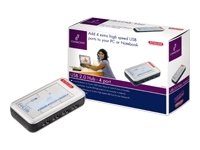
Image 1.1: The Sitecom CN-019 4-Port USB 2.0 Powered Hub, showing its compact design and multiple USB ports.
2. 패키지 내용
포장 내용물을 확인해 주십시오. 누락되거나 손상된 품목이 있을 경우 판매점에 문의하십시오.
- Sitecom CN-019 4-Port USB 2.0 Hub
- 110/220 V AC Power Adapter
- USB Cable (for connecting the hub to your computer)
- 사용 설명서 (본 문서)
3. 설정
Follow these steps to set up your Sitecom CN-019 USB hub:
- 전원 어댑터 연결: Plug the included 110/220 V AC power adapter into the power input port on the Sitecom CN-019 hub. Then, plug the power adapter into a standard electrical outlet. This provides external power to the hub and connected devices.
- 컴퓨터에 연결: Use the provided USB cable to connect the upstream USB port on the Sitecom CN-019 hub to an available USB port on your computer or notebook.
- 드라이버 설치(필요한 경우): The Sitecom CN-019 is typically plug-and-play. Your operating system (Windows 98/ME/2000/XP, Mac OS) should automatically detect and install the necessary drivers. If prompted, follow the on-screen instructions.
- USB 장치 연결: Once the hub is recognized, you can connect your USB devices (e.g., mouse, keyboard, printer, external hard drive) to the four available downstream USB ports on the hub.
The hub's status indicator (if present) should illuminate, indicating it is powered and ready for use.
4. 사용 설명서
The Sitecom CN-019 USB hub operates as a standard USB 2.0 hub, extending your computer's USB capabilities.
- 데이터 전송: The hub supports USB 2.0 specifications, allowing data transfer speeds of up to 480 Mbps. This is suitable for most peripherals and data storage devices.
- 이전 버전과의 호환성: It is fully backward compatible with USB 1.1 devices, though data transfer speeds will be limited to USB 1.1 rates (up to 12 Mbps) when such devices are connected.
- Powered Ports: The external power adapter ensures that each of the four ports can provide sufficient power to connected devices, which is crucial for devices like external hard drives that require more power than a bus-powered hub can typically supply.
- 핫 스와핑: USB devices can be connected and disconnected from the hub while your computer is running, without needing to restart.
5. 유지관리
To ensure the longevity and optimal performance of your Sitecom CN-019 USB hub, follow these simple maintenance guidelines:
- 청소: 허브 외부를 닦을 때는 부드럽고 마른 천을 사용하십시오. 액체 세척제나 스프레이형 세척제는 기기를 손상시킬 수 있으므로 사용하지 마십시오.
- 저장: 장기간 사용하지 않을 경우 허브를 직사광선과 극한 온도 변화를 피해 서늘하고 건조한 곳에 보관하십시오.
- 손질: Avoid dropping the hub or subjecting it to strong impacts. Do not attempt to open the casing, 그렇게 하면 보증이 무효화됩니다.
- 통풍: Ensure the hub is placed in an area with adequate ventilation to prevent overheating.
6. 문제 해결
If you encounter issues with your Sitecom CN-019 USB hub, refer to the following common problems and solutions:
| 문제 | 가능한 원인 / 해결책 |
|---|---|
| Hub or connected device is not recognized by the computer. |
|
| Connected device is not receiving enough power or is unstable. |
|
| 데이터 전송 속도가 느립니다. |
|
7. 사양
| 특징 | 세부 사항 |
|---|---|
| 모델 번호 | CN-019 |
| 상표 | 사이트컴 |
| 포트 수 | USB 2.0 다운스트림 포트 4개 |
| 하드웨어 인터페이스 | USB 2.0, USB 1.1 (backward compatible) |
| 데이터 전송 속도 | 최대 480Mbps(USB 2.0) |
| 전원 | 110/220 V AC Adapter (included) |
| 운영 체제 호환성 | Windows 98/ME/2000/XP, Mac OS |
| 특별 기능 | Multi-platform compatible, Powered Hub |
| 재료 | 플라스틱 |
| 치수(패키지) | 21.2 x 15 x 7.2cm; 300g(약) |
8. 보증 및 지원
Sitecom products are designed for reliability and performance. For information regarding warranty terms and conditions, please refer to the warranty card included with your product or visit the official Sitecom website. For technical support or further assistance, please contact Sitecom customer service through their official channels.
보증 청구를 위해 구매 증빙서류로 구매 영수증을 보관하세요.


