
1. 서론
This manual provides instructions for the setup, operation, and maintenance of your Bose MediaMate Computer Speakers. These speakers are designed to enhance the audio experience for your computer, whether for music, movies, or gaming. The compact design and upward-angled sound projection optimize audio delivery for desktop use, occupying minimal desk space.
2. 안전 정보
Please read and follow all safety instructions before using this product to prevent electric shock, fire, or injury. Keep this manual for future reference.
- 스피커를 물이나 습기에 노출시키지 마세요.
- 스피커를 라디에이터, 난방기, 스토브 또는 기타 기기(예: 히터, 히터 등)와 같은 열원 근처에 두지 마십시오. amp열을 생성하는 발전기.
- 제조사가 지정한 부속품/액세서리만 사용하세요.
- 번개 폭풍 시 또는 장기간 사용하지 않을 때는 기기의 플러그를 뽑아두세요.
- 모든 서비스는 자격을 갖춘 서비스 담당자에게 의뢰하십시오. 전원 코드나 플러그가 손상되었거나, 액체가 쏟아졌거나, 물체가 기기에 떨어졌거나, 기기가 비나 습기에 노출되었거나, 정상적으로 작동하지 않거나, 떨어졌을 때와 같이 기기가 어떤 식으로든 손상된 경우 서비스가 필요합니다.
3. 패키지 내용
패키지에 모든 품목이 들어 있는지 확인하세요.
- Bose MediaMate Computer Speakers (2 units)
- 전원 어댑터
- Audio Cable (3.5mm stereo jack)
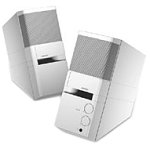
Image: The Bose MediaMate Computer Speakers in Gray. The image shows two compact speakers, one with visible volume and mix controls, and a headphone jack.
4. 설정
Follow these steps to set up your Bose MediaMate Computer Speakers:
- 놓기: Place the speakers on a flat, stable surface on either side of your computer monitor. Ensure they are angled slightly upward towards your listening position for optimal sound.
- 오디오 케이블 연결: Connect the 3.5mm audio cable from the back of the primary speaker (the one with controls) to the audio output jack on your computer.
- 전원 연결: Plug the power adapter into the power input on the primary speaker, then plug the adapter into a wall outlet.
- 전원 켜기: Turn on the speakers using the volume knob. The power indicator light should illuminate.
5. 사용 설명서
Once set up, operating your MediaMate speakers is straightforward:
- 볼륨 조절: Use the large knob labeled "VOLUME" on the front of the primary speaker to adjust the overall sound level.
- 믹스 컨트롤: The "MIX" knob allows you to blend audio from two different sources if you have a second device connected to the auxiliary input.
- 헤드폰 잭: For private listening, plug your headphones into the headphone jack located on the front of the primary speaker. This will mute the speakers.
- 이중 입력: The speakers feature dual inputs, allowing you to connect and mix two audio sources simultaneously. For example, you can connect your computer and a portable music player.
6. 유지관리
스피커의 수명 연장 및 최적의 성능을 보장하려면 다음 사항을 고려하십시오.
- 청소: Use a soft, dry cloth to clean the exterior surfaces of the speakers. Do not use liquid cleaners or aerosols.
- 먼지: 스피커 그릴에 먼지가 쌓여 음질에 영향을 미치는 것을 방지하기 위해 정기적으로 먼지를 제거하십시오.
- 저장: 스피커를 장기간 보관할 경우 전원을 끄고 서늘하고 건조한 곳에 보관하세요.
7. 문제 해결
If you encounter issues with your Bose MediaMate speakers, refer to the following common problems and solutions:
| 문제 | 가능한 원인 | 해결책 |
|---|---|---|
| 소리가 나지 않습니다 |
|
|
| 왜곡된 소리 |
|
|
| 스피커가 하나만 작동합니다 |
|
|
8. 사양
- 상표: 보스
- 모델: MediaMate
- 연결성: 3.5mm Audio Input, AC Power
- 오디오 출력: 스테레오 재생
- 스피커 유형: 멀티미디어
- 재료: 금속
- 스피커 크기: 6 Centimeters (Audio Driver)
- 품목 무게: 3 파운드
- 색상: 회색
9. 보증 및 지원
Bose MediaMate Computer Speakers come with a limited warranty. For specific warranty details and duration, please refer to the warranty card included with your product or visit the official Bose web대지.
For technical support, product registration, or service inquiries, please contact Bose customer service:
- 핸드폰: 800-444-2673
- Web대지: www.bose.com
Please have your product model number (MediaMate) and purchase date available when contacting support.