
1. 서론
구매해주셔서 감사합니다asing the JVC RX-5000R AV Receiver. This manual provides detailed instructions for the proper setup, operation, and maintenance of your receiver. Please read this manual thoroughly before using the unit to ensure optimal performance and safety.
The JVC RX-5000R is an advanced audio/video receiver designed to deliver high-quality sound for your home entertainment system. It features Dolby Surround Pro Logic compatibility, providing 100 watts of output power per channel across five channels. With its 5 separate power amp리퍼tages and 5.1-channel analog input, it supports multi-channel audio formats like Dolby Digital. The integrated RDS tuner allows for convenient radio listening with memory for up to 30 FM and 15 MW/LW stations. The receiver also includes a subwoofer output and 5 audio inputs for connecting various devices. A remote control is included for ease of use.
2. 중요한 안전 정보
Always follow these basic safety precautions when using your JVC RX-5000R AV Receiver to reduce the risk of fire, electric shock, and injury:
- 전원: 본 기기는 볼륨의 AC 콘센트에만 연결하십시오.tage는 후면 패널에 지정되어 있습니다.
- 통풍: 적절한 환기를 확보하십시오. 환기구를 막지 마십시오. 적절한 공기 흐름을 위해 장치 주변에 충분한 공간을 확보하십시오.
- 물과 습기: 제품을 비나 습기에 노출시키지 마십시오. 꽃병 등 액체가 담긴 물건을 제품 위에 올려놓지 마십시오.
- 열: 라디에이터, 난방 장치, 스토브 또는 기타 장치(예: 열원)에서 장치를 멀리 두십시오. amp열을 생성하는 발전기.
- 청소: 청소하기 전에 벽면 콘센트에서 제품의 플러그를 뽑으세요. 마른 천을 사용하여 청소하세요.
- 서비스: 이 제품을 직접 수리하려고 하지 마십시오. 모든 서비스는 자격을 갖춘 서비스 담당자에게 문의하십시오.
- 번개: 번개가 치거나 장기간 사용하지 않을 때에는 장치의 플러그를 뽑아 두십시오.
3. 설정 및 연결
This section guides you through connecting your JVC RX-5000R AV Receiver to your speakers, audio sources, and power supply.
3.1 풀기
수신기 및 모든 액세서리를 포장에서 조심스럽게 꺼내십시오. 모든 구성품이 있는지 확인하십시오.
- JVC RX-5000R AV Receiver
- 원격 제어
- FM 안테나
- AM 루프 안테나
- 전원 코드
- 사용 설명서(본 문서)
3.2 스피커 연결
The RX-5000R supports a 5.1 channel speaker configuration. Connect your speakers as follows:
- Front Speakers (Left/Right): FRONT L/R 단자에 연결합니다.
- 센터 스피커: CENTER 터미널에 연결하세요.
- Surround Speakers (Left/Right): SURROUND L/R 단자에 연결합니다.
- 서브 우퍼 : 액티브 서브우퍼를 SUBWOOFER PRE OUT 잭에 연결하십시오.
메모: Ensure correct polarity (+ to + and - to -) for all speaker connections to prevent phase issues and ensure optimal sound quality.
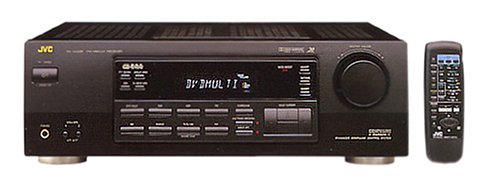
Figure 1: Rear panel of the JVC RX-5000R showing speaker and audio input terminals. This image illustrates the various connection points for speakers and external audio devices.
3.3 오디오 소스 연결
Connect your audio components (CD player, DVD player, TV, etc.) to the appropriate audio input jacks on the rear panel.
- 아날로그 오디오 입력: The receiver features 5 analog audio inputs. Use RCA cables to connect your devices to these inputs (e.g., CD, TAPE, VCR, DVD, TV).
- 디지털 오디오 입력: The receiver supports Optical and Coaxial digital audio inputs. Connect compatible devices (e.g., DVD player, game console) to these inputs for high-quality digital sound.
- 5.1 Channel Analog Input: For devices with multi-channel analog outputs (e.g., older DVD players with built-in Dolby Digital/DTS decoders), connect to the 5.1 CH INPUT jacks.
3.4 안테나 연결
라디오 수신을 위해 제공된 FM 및 AM 안테나를 연결하십시오.
- FM 안테나: Connect the FM wire antenna to the FM 75Ω COAXIAL terminal. Extend the wire for best reception.
- AM 안테나: Assemble the AM loop antenna and connect its wires to the AM terminals. Position the antenna for optimal reception.
3.5 전원 연결
After all audio and speaker connections are made, connect the power cord to the AC inlet on the receiver and then to a wall outlet.
4. 기본 동작
This section covers the fundamental operations of your JVC RX-5000R AV Receiver.
4.1 전원 켜기/끄기
를 누르세요 힘 수신기를 켜거나 끄려면 전면 패널이나 리모컨의 버튼을 누르세요.
4.2 입력 선택
사용하세요 입력 선택기 knob on the front panel or the corresponding input buttons (e.g., CD, DVD, TV/VCR) on the remote control to select your desired audio source.
4.3 볼륨 조절
큰 볼륨을 사용하여 마스터 볼륨을 조정합니다. 용량 전면 패널의 손잡이 또는 볼륨 +/- 리모컨의 버튼.
4.4 Sound Mode Selection
The RX-5000R offers various sound modes, including Dolby Surround Pro Logic. Press the 사운드 모드 button on the remote control or front panel to cycle through available modes and select the one best suited for your content.
4.5 Tuner Operation (RDS)
라디오를 들으려면:
- 선택하세요 조율사 입력.
- 누르다 밴드 to select FM or AM.
- 사용하세요 튜닝 +/- buttons to manually tune to a station or 오토튠 to scan for stations.
- To store a station, press 메모리, 그런 다음 사용하세요 사전 설정 +/- 미리 설정된 숫자를 선택하려면 버튼을 누르고 누르세요. 메모리 again to confirm. The receiver supports up to 30 FM and 15 MW/LW presets.
- 그만큼 RDS (Radio Data System) feature, if available on the broadcast, will display station information such as program type or station name.
5. 유지관리
Proper care and maintenance will ensure the longevity and optimal performance of your JVC RX-5000R AV Receiver.
- 장치 청소: Disconnect the power cord before cleaning. Use a soft, dry cloth to wipe the exterior surfaces. Do not use abrasive cleaners, waxes, or solvents as they may damage the finish.
- 통풍: Regularly check that the ventilation openings are not obstructed by dust or debris. Blocked vents can lead to overheating.
- 전원 코드: Inspect the power cord periodically for any signs of damage. If damaged, contact qualified service personnel for replacement.
- 저장: 장기간 보관할 경우 전원 콘센트에서 분리하고 직사광선과 극한의 온도를 피해 서늘하고 건조한 곳에 보관하세요.
6. 문제 해결
Before contacting service personnel, please refer to the following table for common issues and their solutions.
| 문제 | 가능한 원인 | 해결책 |
|---|---|---|
| 전원이 없습니다 | 전원 코드가 제대로 연결되지 않았습니다. 전원 콘센트가 활성화되지 않았습니다. | Ensure the power cord is firmly plugged into the receiver and the wall outlet. 다른 장치로 콘센트를 테스트하세요. |
| 소리가 나지 않습니다 | 잘못된 입력이 선택되었습니다. 스피커 선이 헐거워졌거나 잘못 연결되었습니다. 볼륨이 너무 낮거나 음소거되어 있습니다. Source device is not playing or has low volume. | 올바른 입력 소스를 선택하십시오. 모든 스피커 연결부의 극성이 올바르고 단단히 고정되었는지 확인하십시오. Increase volume and check if MUTE is active. Ensure the source device is playing and its volume is adequate. |
| 라디오 수신 불량 | 안테나가 제대로 연결되지 않았거나 위치가 잘못되었습니다. 다른 전자 장치의 간섭. | Adjust the position and orientation of the FM and AM antennas. Move the receiver or antennas away from other electronic devices. |
| 리모컨이 작동하지 않습니다 | 배터리가 방전되었거나 잘못 삽입되었습니다. 리모컨과 수신기 사이에 장애물이 있습니다. | 배터리를 새 배터리로 교체하고 극성이 올바른지 확인하세요. Remove any obstacles and ensure the remote is pointed at the receiver's sensor. |
7. 사양
이러한 사양은 예고 없이 변경될 수 있습니다.
- 모델: JVC RX-5000R
- 출력 전력: 100 Watts per channel (5 channels)
- 오디오 채널: 5.1 서라운드 사운드
- 서라운드 사운드 구성: 5.1
- 오디오 출력 모드: 둘러싸다
- 연결 기술 : Optical, Coaxial, 3.5 mm jack (for audio inputs)
- 오디오 입력 : 5 Analog Audio Inputs, 5.1 Channel Analog Input, Digital Optical, Digital Coaxial
- 조율사: RDS (Radio Data System) compatible FM/AM tuner
- 튜너 사전 설정: 30 FM, 15 MW/LW
- 제어 유형: Push button, Remote control
- 호환 장치: Television, CD players, DVD players, etc.
- 제조업체: 제이비씨(JVC)
Note: The listed "Aantal HDMI-poorten: 5" in some product data refers to general input count and not necessarily HDMI video ports for this model. This receiver primarily handles audio and older video signals via analog connections.
8. 보증 및 고객 지원
JVC products are manufactured to the highest quality standards. For warranty information, please refer to the separate warranty card included with your product or visit the official JVC web귀하의 지역에 대한 사이트.
For technical assistance, troubleshooting beyond this manual, or service inquiries, please contact JVC customer support. Contact details can typically be found on the official JVC web사이트 또는 제품 포장에 포함되어 있습니다.
When contacting support, please have your model number (RX-5000R) and serial number ready.


