
중요한 안전 정보
Please read all safety and operating instructions carefully before using this VCR. Retain this manual for future reference.
- 전원: Connect the VCR only to the power supply indicated on the label.
- 통풍: 충분한 환기를 유지하세요. 환기구를 막지 마세요.
- 물과 습기: Do not expose the VCR to rain or moisture. Do not place objects filled with liquids on the VCR.
- 청소: Unplug the VCR from the wall outlet before cleaning. Use a dry cloth.
- 서비스: 이 제품을 직접 수리하려고 하지 마십시오. 모든 서비스는 자격을 갖춘 서비스 담당자에게 문의하십시오.
제품 끝view
The Sharp VC-A422 is a 4-head VCR designed for reliable playback and recording of VHS tapes. It features a user-friendly interface for easy operation.
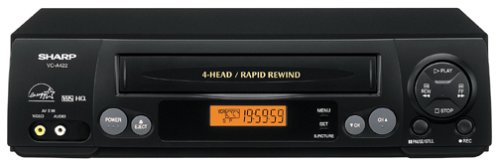
이미지: 앞면 view of the Sharp VC-A422 4-Head VCR, showing the tape slot, display, and control buttons.
설정
1. 풀기 및 배치
- VCR을 포장에서 조심스럽게 꺼내세요.
- Place the VCR on a stable, level surface. Ensure there is adequate space around the unit for ventilation.
- Avoid placing the VCR near heat sources, direct sunlight, or areas with high humidity.
2. TV에 연결하기
To connect your VCR to a television, you will typically use RCA audio/video cables (red, white, yellow) or a coaxial cable.
- RCA Connection (Recommended for best quality):
- 비디오 녹화기의 노란색 비디오 출력 단자를 TV의 노란색 비디오 입력 단자에 연결하십시오.
- 비디오 플레이어의 흰색 오디오 출력 단자를 TV의 흰색 오디오 입력 단자에 연결하세요.
- 비디오 플레이어의 빨간색 오디오 출력 단자를 TV의 빨간색 오디오 입력 단자에 연결하세요.
- Select the corresponding AV input on your television (e.g., Video 1, AV1, Input 1).
- 동축 연결:
- Connect a coaxial cable from the "RF Out" or "Antenna Out" jack on the VCR to the "Antenna In" or "RF In" jack on your TV.
- Connect your antenna or cable TV signal to the "RF In" or "Antenna In" jack on the VCR.
- Tune your television to channel 3 or 4 (depending on the VCR's output setting) to receive the VCR signal.
3. 전원 연결
- VCR의 전원 코드를 표준 전기 콘센트에 꽂습니다.
- The VCR should enter standby mode, indicated by a clock display or power light.
작동 지침
1. 기본 재생
- Ensure the VCR is powered on and your TV is set to the correct input.
- VHS 테이프를 테이프 슬롯에 넣으세요. 비디오 플레이어가 자동으로 테이프를 로드합니다.
- 를 누르세요 놀다 VCR이나 리모컨의 버튼을 누르세요.
- 재생을 중지하려면 멈추다 단추.
- 재생을 일시 정지하려면 정지시키다 버튼을 누릅니다. 다시 누르면 다시 시작됩니다.
- 빨리 감기 또는 되감기를 하려면 버튼을 누르세요. FF (Fast Forward) or 리우 (Rewind) button. Press 놀다 일반 재생을 다시 시작하려면
- 테이프를 꺼내려면 다음을 누르세요. 꺼내다 단추.
2. 프로그램 녹화
The Sharp VC-A422 allows for recording television programs. Ensure a blank or recordable VHS tape is inserted and its safety tab is intact.
- Tune the VCR to the desired channel using the VCR's tuner.
- 를 누르세요 기록 버튼을 누르세요. VCR이 녹화를 시작합니다.
- 녹음을 중지하려면 멈추다 단추.
- For timed recordings, refer to the VCR's on-screen programming guide (if available) or consult the full manual for detailed timer recording instructions.
유지
적절한 유지 관리는 VCR의 수명과 최적의 성능을 보장합니다.
- 외부 청소: Wipe the exterior of the VCR with a soft, dry cloth. Do not use liquid cleaners or abrasive materials.
- 헤드 세척: If picture quality degrades (e.g., snowy picture, lines), the video heads may be dirty. Use a dry-type VCR head cleaning cassette sparingly. Excessive use can wear down the heads.
- 테이프 관리: Store VHS tapes in their cases, away from dust, direct sunlight, and strong magnetic fields. Avoid exposing tapes to extreme temperatures.
- 통풍: Keep the VCR's ventilation slots clear of obstructions to prevent overheating.
문제 해결
If you encounter issues with your Sharp VC-A422 VCR, refer to the following common problems and solutions:
| 문제 | 가능한 원인 | 해결책 |
|---|---|---|
| 전원이 없습니다 | 전원 코드가 뽑혀 있습니다. 전원 콘센트가 작동하지 않습니다. | 전원 코드 연결을 확인하세요. 다른 기기로 콘센트를 테스트해 보세요. |
| 그림이나 소리가 나지 않습니다 | 잘못된 TV 입력 소스가 선택되었거나, 오디오/비디오 케이블이 헐거워졌거나 잘못 연결되었습니다. | Select correct TV input (e.g., AV1, Video 1). Ensure A/V cables are securely connected to matching color ports. |
| Snowy or distorted picture | Dirty video heads; poor tape quality; incorrect channel for coaxial connection. | Use a VCR head cleaning cassette. Try a different tape. If using coaxial, ensure TV is on channel 3 or 4. |
| Tape will not eject | Power failure; mechanical issue. | Ensure VCR is powered on. If problem persists, seek professional service. |
| 녹음할 수 없음 | Tape's safety tab removed; VCR not tuned to a channel. | Check if the safety tab on the VHS tape is intact (cover the notch with tape if removed). Ensure VCR tuner is set to the desired channel. |
명세서
- 상표: 날카로운
- 모델: VC-A422
- 앞면: 4-Head (Video)
- 품목 무게: 6파운드
- 패키지 크기: 15.55 x 11.02 x 5.24 인치
- ASIN: B00005LABU
- 첫 이용 가능 날짜: 4년 1999월 XNUMX일
참고 : 사양은 예고없이 변경 될 수 있습니다.
보증 정보
This Sharp product is covered by a limited warranty. For specific details regarding warranty coverage, duration, and terms, please refer to the warranty card included with your purchase or visit the official Sharp web사이트. 보증 청구를 위해 구매 증빙 자료를 보관하세요.
고객 지원
For further assistance, technical support, or service inquiries, please contact Sharp customer support. You can find contact information on the official Sharp web사이트 또는 제품과 함께 제공된 설명서를 참조하세요.
Visit the official Sharp store for more information: Sharp Official Store
법적 고지사항
소비자 경고: 이 텔레비전 수신기는 아날로그 방송 튜너만 탑재되어 있으며, 미국이 디지털 방송으로 전환함에 따라 2009년 2월 17일 이후 안테나를 사용하여 공중파 방송을 수신하려면 컨버터 박스가 필요합니다. 아날로그 전용 TV는 케이블 및 위성 TV 서비스, 게임 콘솔, VCR, DVD 플레이어 및 유사 제품과 함께 이전과 같이 작동할 것입니다. 더 자세한 정보는 연방통신위원회(FCC) 1-888-225-5322(TTY: 1-888-835-5322)로 문의하거나 위원회의 디지털 텔레비전 웹사이트를 방문하십시오. Web 사이트 위치: www.dtv.gov.