
1. 소개 및 이상view
The Brother CTS-410-ES is a versatile 4-line executive phone system designed for efficient communication in office or home environments. It can function as a stand-alone unit or integrate into a larger system. Key features include a built-in caller ID, a 99-number call log, and a desktop data port for convenient access to line 4. This manual provides detailed instructions for setup, operation, maintenance, and troubleshooting to ensure optimal performance of your device.
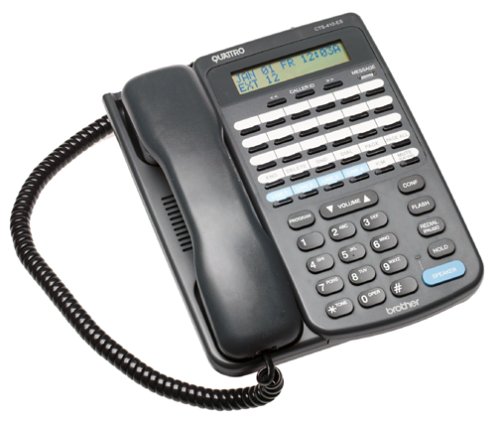
앞쪽 view of the Brother CTS-410-ES 4-line executive phone system, showing the keypad, display, and line buttons.
2. 안전 정보
Please read and follow these safety precautions to prevent damage to the unit and ensure your safety:
- 본 제품을 물이나 습기에 노출시키지 마십시오.
- 열원이나 직사광선 근처에 장치를 두지 마십시오.
- 장치와 함께 제공된 전원 어댑터만 사용하십시오.
- 직접 기기를 열거나 수리하지 마십시오. 모든 정비는 자격을 갖춘 기술자에게 맡기십시오.
- 제품을 강한 전자기장에서 멀리 두십시오.
3. 패키지 내용
패키지에 다음 품목이 포함되어 있는지 확인하십시오.
- Brother CTS-410-ES 4-Line Executive Phone System Unit
- AC 전원 어댑터
- Telephone Line Cords (typically 4)
- Noise-Canceling Headset
- 사용 설명서 (본 문서)
4. 설정
Follow these steps to set up your Brother CTS-410-ES phone system:
- 전원 연결: Plug the AC power adapter into the power jack on the back of the phone unit, then plug the adapter into a standard electrical outlet.
- Connect Telephone Lines: Connect each telephone line cord from your wall jacks to the corresponding line jacks (Line 1, Line 2, Line 3, Line 4) on the back of the phone unit.
- 헤드셋 연결: If using the included noise-canceling headset, plug it into the dedicated headset jack on the side or front of the phone unit.
- 초기 전원 켜기: The unit should power on automatically. The display will illuminate, and you may hear a brief self-test sequence.
5. 사용 설명서
This section details the various functions and operations of your phone system.
5.1 기본 호출 함수
- 전화 걸기: Lift the handset or press the SPEAKER button. Select an available line button (Line 1-4). Dial the desired number.
- 전화 받기 : When the phone rings, lift the handset or press the SPEAKER button. The corresponding line button will flash.
- 통화 종료: Place the handset back in the cradle or press the SPEAKER button again if using the speakerphone.
- 잡고 있다: During a call, press the HOLD button to place the call on hold. Press the flashing line button to resume the call.
5.2 발신자 번호 표시 및 통화 기록
- 거는 사람 확인: When a call comes in, the caller's name and number will appear on the display (if available from your service provider).
- 통화 기록: The system stores up to 99 incoming calls. Use the navigation buttons (e.g., UP/DOWN arrows) to scroll through the call log.
- 통화 기록에서 전화 걸기: Select an entry from the call log and press the DIAL or SPEAKER button to call back.
5.3 스피커폰 및 헤드셋
- 스피커폰: Press the SPEAKER button to activate hands-free communication. Adjust volume using the volume controls.
- 헤드셋 작동: With the headset connected, press the HEADSET button (if available) or simply lift the handset to activate the headset for calls.
5.4 Intercom and Paging
- 기내 통화 장치: If multiple CTS-410-ES units are connected, use the INTERCOM function to communicate between units. Refer to your system's specific intercom setup.
- 페이징 : Use the PAGING function to broadcast an announcement to other connected units.
5.5 Message Waiting Light and Data Port
- 메시지 대기 표시등: A dedicated light will illuminate to indicate new messages (requires compatible voicemail service from your provider).
- Desktop Data Port: The data port provides quick access to Line 4, allowing you to connect a modem or other data device.
6. 유지관리
Proper maintenance ensures the longevity and performance of your phone system.
- 청소: Wipe the unit with a soft, dry cloth. Do not use liquid or aerosol cleaners.
- 저장: If storing the unit for an extended period, disconnect it from power and telephone lines. Store in a cool, dry place.
- 코드 관리 : Ensure all cords are free from kinks or damage. Replace damaged cords immediately.
7. 문제 해결
If you encounter issues with your phone system, try these common solutions:
| 문제 | 가능한 해결책 |
|---|---|
| 다이얼 톤이 없습니다 | Check all telephone line connections. Ensure the power adapter is securely plugged in. Test with a different phone line if possible. |
| 발신자 번호가 표시되지 않습니다 | Verify that Caller ID service is activated with your telephone service provider. Ensure the phone is connected to a compatible line. |
| 스피커폰 소리가 작거나 왜곡됩니다 | Adjust the speaker volume. Ensure the microphone is not obstructed. Move closer to the unit. |
| Message waiting light not working | Confirm that you have voicemail service with your provider and that it is properly configured. |
8. 사양
Technical specifications for the Brother CTS-410-ES phone system:
| 특징 | 세부 사항 |
|---|---|
| 상표 | 형제 |
| 모델 번호 | CTS-410-ES |
| 전화 유형 | 유선 |
| 줄의 수 | 4 |
| 전원 | 코드식 전기 |
| 다이얼러 유형 | 단일 키패드 |
| 품목 치수(L x W x H) | 17.8 x 22.9 x 10.8cm |
| 응답 시스템 유형 | 디지털 |
| 컨퍼런스 콜 기능 | 4방향 |
| 다중 라인 작업 | 예 |
| 발신자 식별 | 예 |
| 기록 용량 | 20 Minutes (for answering system, if applicable) |
| 확장 가능 | Yes, with other optional CTS410ES units |
| Call Log Memory | 99개의 숫자 |
| 헤드셋 잭 | 예 |
| Desktop Data Port | Yes (for Line 4) |
9. 보증 및 지원
This Brother CTS-410-ES product comes with a 90일 한정 보증. For warranty claims or technical assistance, please contact Brother customer support. Keep your purchase receipt as proof of purchase.
For further support, visit the official Brother support web웹사이트를 방문하거나 가까운 대리점에 문의하십시오.
